

Poi Software
You can access the code and necessary libraries by downloading the Project Bundle.
To do this, click on the Download Project Bundle button in the window below. It will download to your computer as a zipped folder.
# SPDX-FileCopyrightText: 2026 Erin St Blaine for Adafruit Industries
# SPDX-License-Identifier: MIT
# pylint: disable=too-many-lines,global-statement,redefined-outer-name,too-many-statements,too-many-boolean-expressions
# RF-controlled / Standalone POV Poi
#
# Hardware:
# Adafruit Feather RP2040 RFM69
# 36-pixel DotStar strip
#
# DotStar wiring:
# Clock -> SDA / GP2
# Data -> SCL / GP3
#
# Battery monitor:
# Battery divider -> A0
#
# Images:
# /img/<folder>/*.bmp
#
# The folder names and alphabetical BMP order should match the controller.
#
# Radio packet format:
#
# S,folder,image,running,brightness,speed,auto,interval
#
# Example:
#
# S,halloween,2,1,25,500,1,8
#
# Modes:
#
# STARTUP:
# Show battery level, then listen briefly for controller.
#
# STANDALONE:
# If no controller is detected, automatically cycle
# through local /img files.
#
# CONTROLLER:
# As soon as a valid controller packet is received,
# switch permanently to controller control until reboot.
import gc
import os
import time
import board
import analogio
import digitalio
import adafruit_dotstar
import adafruit_imageload
import adafruit_rfm69
# ===========================================================================
# SETTINGS
# ===========================================================================
NUM_LEDS = 36
IMAGE_ROOT = "/img"
DEFAULT_FOLDER = "default"
# True = rotate normal right-side-up BMPs 180 degrees for poi playback.
ROTATE_IMAGE_180 = True
RADIO_FREQ_MHZ = 915.0
# New preferred default.
DEFAULT_BRIGHTNESS = 25
DEFAULT_SPEED = 500
DEFAULT_INTERVAL = 8
MIN_SPEED = 100
MAX_SPEED = 1500
# How often to check the radio.
RADIO_POLL_NS = 50_000_000
DOTSTAR_BAUDRATE = 8_000_000
# After battery display, listen this long before beginning standalone mode.
CONTROLLER_DETECT_SECONDS = 3.0
# ===========================================================================
# BATTERY MONITOR
# ===========================================================================
BATTERY_PIN = board.A0
BATTERY_MIN = 3.2
BATTERY_MAX = 4.2
BATTERY_GREEN = 3.75
BATTERY_YELLOW = 3.45
BATTERY_DISPLAY_SECONDS = 3.0
# Dim blue "powered and listening" pixel.
WAITING_COLOR = (
0,
0,
30,
)
# ===========================================================================
# RFM69 RADIO
# ===========================================================================
spi = board.SPI()
radio_cs = digitalio.DigitalInOut(
board.RFM_CS
)
radio_reset = digitalio.DigitalInOut(
board.RFM_RST
)
rfm69 = adafruit_rfm69.RFM69(
spi,
radio_cs,
radio_reset,
RADIO_FREQ_MHZ,
)
print(
"RFM69 ready at",
rfm69.frequency_mhz,
"MHz",
)
# ===========================================================================
# DOTSTAR
# ===========================================================================
pixels = adafruit_dotstar.DotStar(
board.SDA,
board.SCL,
NUM_LEDS,
brightness=DEFAULT_BRIGHTNESS / 100.0,
auto_write=False,
pixel_order=adafruit_dotstar.BGR,
baudrate=DOTSTAR_BAUDRATE,
)
pixels.fill(0)
pixels.show()
# ===========================================================================
# BATTERY ADC
# ===========================================================================
battery_adc = analogio.AnalogIn(
BATTERY_PIN
)
# ===========================================================================
# STATE
# ===========================================================================
brightness = DEFAULT_BRIGHTNESS
speed = DEFAULT_SPEED
interval = DEFAULT_INTERVAL
running = False
autoplay = False
# False until the first valid controller packet is received.
controller_mode = False
# Becomes True if startup times out and local playback begins.
standalone_started = False
# Time of the most recent standalone image change.
last_standalone_advance = (
time.monotonic()
)
# Controller-mode autoplay also runs locally so a roaming POI
# keeps cycling if it temporarily loses RF range.
last_controller_advance = (
time.monotonic()
)
# ===========================================================================
# BATTERY + WAITING DISPLAY
# ===========================================================================
def read_battery_voltage():
"""Read battery voltage through a 100k / 100k divider."""
total = 0
for _ in range(32):
total += battery_adc.value
time.sleep(
0.002
)
average = (
total / 32
)
adc_voltage = (
average
* 3.3
/ 65535
)
# 100k / 100k divider halves battery voltage.
return (
adc_voltage * 2.0
)
def show_waiting_pixel():
"""Show one dim blue pixel while stopped/listening."""
pixels.fill(0)
pixels[0] = (
WAITING_COLOR
)
pixels.show()
def show_battery_startup():
"""Show battery charge as a 36-pixel bar."""
voltage = (
read_battery_voltage()
)
print(
"Battery:",
f"{voltage:.2f}",
"V",
)
fraction = (
voltage
- BATTERY_MIN
) / (
BATTERY_MAX
- BATTERY_MIN
)
fraction = max(
0.0,
min(
1.0,
fraction,
),
)
lit_pixels = int(
fraction
* NUM_LEDS
+ 0.5
)
if voltage >= BATTERY_GREEN:
color = (
0,
100,
0,
)
elif voltage >= BATTERY_YELLOW:
color = (
100,
60,
0,
)
else:
color = (
100,
0,
0,
)
pixels.fill(0)
for pixel in range(
lit_pixels
):
pixels[pixel] = (
color
)
pixels.show()
time.sleep(
BATTERY_DISPLAY_SECONDS
)
show_waiting_pixel()
# ===========================================================================
# IMAGE MANAGEMENT
# ===========================================================================
def is_directory(path):
"""Return True when path is a directory."""
try:
return bool(
os.stat(path)[0]
& 0x4000
)
except OSError:
return False
def find_folders():
"""Return available image folders from /img."""
try:
names = os.listdir(
IMAGE_ROOT
)
except OSError:
print(
"ERROR: No /img folder found."
)
return []
found = []
for name in names:
if name.startswith("."):
continue
path = (
IMAGE_ROOT
+ "/"
+ name
)
if is_directory(path):
found.append(
name
)
found.sort()
return found
def current_image_folder():
"""Return the active folder path."""
return (
IMAGE_ROOT
+ "/"
+ current_folder
)
def find_images(
folder_name
):
"""Return BMP files in one folder, alphabetically."""
path = (
IMAGE_ROOT
+ "/"
+ folder_name
)
try:
names = os.listdir(
path
)
except OSError:
print(
"ERROR: Folder not found:",
path,
)
return []
files = []
for name in names:
if name.startswith("."):
continue
if name.lower().endswith(
".bmp"
):
files.append(
name
)
files.sort()
return files
available_folders = (
find_folders()
)
if not available_folders:
raise RuntimeError(
"No image folders found in /img. "
"Create /img/default and put BMP files inside it."
)
if DEFAULT_FOLDER in available_folders:
current_folder = (
DEFAULT_FOLDER
)
else:
current_folder = (
available_folders[0]
)
def palette_color(
shader,
pixel_value,
):
"""Convert indexed pixel value to RGB888."""
try:
return (
int(
shader[
pixel_value
]
)
& 0xFFFFFF
)
except (
TypeError,
AttributeError,
) as error:
raise ValueError(
"Image is not indexed/paletted."
) from error
def load_image(
filename
):
"""Load one 36-pixel-high indexed BMP, optionally rotated 180 degrees."""
path = (
current_image_folder()
+ "/"
+ filename
)
print()
print(
"Loading:",
path,
)
gc.collect()
print(
"Free RAM before:",
gc.mem_free(),
)
bitmap, shader = (
adafruit_imageload.load(
path
)
)
width = (
bitmap.width
)
height = (
bitmap.height
)
print(
"Image size:",
width,
"x",
height,
)
if height != NUM_LEDS:
del bitmap
del shader
gc.collect()
raise ValueError(
f"Image must be exactly {NUM_LEDS} pixels high; "
f"this image is {height}."
)
rgb = bytearray(
width
* NUM_LEDS
* 3
)
out = 0
for x in range(
width
):
for y in range(
NUM_LEDS
):
if ROTATE_IMAGE_180:
source_x = width - 1 - x
source_y = NUM_LEDS - 1 - y
else:
source_x = x
source_y = y
pixel_value = bitmap[
source_x,
source_y,
]
color = palette_color(
shader,
pixel_value,
)
rgb[out] = (
color >> 16
) & 0xFF
rgb[
out + 1
] = (
color >> 8
) & 0xFF
rgb[
out + 2
] = (
color
) & 0xFF
out += 3
del bitmap
del shader
gc.collect()
print(
"POV columns:",
width,
)
print(
"Converted bytes:",
len(rgb),
)
print(
"Free RAM after:",
gc.mem_free(),
)
return (
rgb,
width,
)
# ===========================================================================
# IMAGE LIST
# ===========================================================================
image_files = (
find_images(
current_folder
)
)
if not image_files:
raise RuntimeError(
f"No BMP images found in {current_image_folder()}"
)
print()
print(
"Starting folder:",
current_folder,
)
print(
"Found",
len(image_files),
"BMP images:",
)
for number, filename in enumerate(
image_files
):
print(
number,
filename,
)
# ===========================================================================
# LOAD STARTING IMAGE
# ===========================================================================
image_number = 0
image_data, image_width = (
load_image(
image_files[
image_number
]
)
)
image_line = 0
# ===========================================================================
# PLAYBACK TIMING
# ===========================================================================
scanline_period_ns = int(
1_000_000_000
/ speed
)
next_scanline_ns = (
time.monotonic_ns()
)
last_radio_poll_ns = 0
# ===========================================================================
# DOTSTAR OUTPUT
# ===========================================================================
def blank_pixels():
"""Turn all LEDs off."""
pixels.fill(0)
pixels.show()
def draw_scanline(
line_number
):
"""Draw one image column to the 36 DotStars."""
base = (
line_number
* NUM_LEDS
* 3
)
for led in range(
NUM_LEDS
):
offset = (
base
+ led * 3
)
color = (
(
image_data[
offset
]
<< 16
)
|
(
image_data[
offset + 1
]
<< 8
)
|
image_data[
offset + 2
]
)
pixels[
led
] = color
pixels.show()
# ===========================================================================
# IMAGE CHANGE
# ===========================================================================
def select_image(
new_number
):
"""Load a local image by index."""
global image_number
global image_data
global image_width
global image_line
global next_scanline_ns
new_number %= len(
image_files
)
# Repeated controller packets may request the image
# already in RAM. Do not reload it unnecessarily.
if (
new_number
== image_number
):
return True
print()
print(
"Changing image to",
new_number,
":",
image_files[
new_number
],
)
# Remember the currently working image so it can be
# reloaded if the requested BMP is corrupt or unsupported.
old_number = image_number
old_filename = image_files[
old_number
]
blank_pixels()
image_data = None
gc.collect()
try:
new_data, new_width = (
load_image(
image_files[
new_number
]
)
)
except (
MemoryError,
ValueError,
OSError,
RuntimeError,
) as error:
print(
"Image load failed:",
error,
)
# The decoded buffer had to be released before loading the
# replacement to conserve RAM. Restore the last known-good
# image from CIRCUITPY instead of leaving image_data as None.
try:
image_data, image_width = (
load_image(
old_filename
)
)
image_number = (
old_number
)
image_line = 0
next_scanline_ns = (
time.monotonic_ns()
)
print(
"Restored previous image:",
old_filename,
)
except (
MemoryError,
ValueError,
OSError,
RuntimeError,
) as restore_error:
print(
"Could not restore previous image:",
restore_error,
)
# Stop safely rather than attempting playback with
# an invalid image buffer.
image_data = bytearray()
image_width = 0
return False
if not running:
show_waiting_pixel()
return False
image_number = (
new_number
)
image_data = (
new_data
)
image_width = (
new_width
)
image_line = 0
next_scanline_ns = (
time.monotonic_ns()
)
print(
"Now playing:",
image_files[
image_number
],
)
if not running:
show_waiting_pixel()
return True
def switch_folder(
new_folder
):
"""Switch folders, skipping unreadable BMPs until one loads."""
global current_folder
global image_files
global image_number
global image_data
global image_width
global image_line
global next_scanline_ns
if new_folder == current_folder:
return True
if new_folder not in available_folders:
print(
"Folder not found on this POI:",
new_folder,
)
return False
new_files = find_images(
new_folder
)
if not new_files:
print(
"Folder has no BMP images:",
new_folder,
)
return False
print()
print(
"Switching folder:",
current_folder,
"->",
new_folder,
)
# Save the old state so we can recover cleanly if every BMP
# in the requested folder fails to load.
old_folder = current_folder
old_files = image_files
old_number = image_number
old_data = image_data
old_width = image_width
blank_pixels()
# Point load_image() at the requested folder while we test its files.
current_folder = new_folder
loaded_data = None
loaded_width = 0
loaded_number = None
for candidate_number, candidate_name in enumerate(
new_files
):
try:
loaded_data, loaded_width = load_image(
candidate_name
)
loaded_number = candidate_number
break
except (
MemoryError,
ValueError,
OSError,
RuntimeError,
) as error:
print(
"Skipping bad image:",
candidate_name,
"-",
error,
)
gc.collect()
if loaded_data is None:
print(
"Folder switch failed: no usable BMP images in",
new_folder,
)
current_folder = old_folder
image_files = old_files
image_number = old_number
image_data = old_data
image_width = old_width
if not running:
show_waiting_pixel()
return False
# New folder is good. Release the old decoded image only now.
image_files = new_files
image_number = loaded_number
image_data = loaded_data
image_width = loaded_width
image_line = 0
next_scanline_ns = time.monotonic_ns()
del old_data
gc.collect()
print(
"Folder ready:",
current_folder,
"-",
len(image_files),
"images; starting at",
image_number,
image_files[image_number],
)
return True
# ===========================================================================
# MODE CONTROL
# ===========================================================================
def enter_controller_mode():
"""Switch permanently from standalone to controller mode."""
global controller_mode
global standalone_started
if controller_mode:
return
controller_mode = True
standalone_started = False
print()
print(
"================================"
)
print(
"CONTROLLER DETECTED"
)
print(
"Switching to CONTROLLER MODE"
)
print(
"================================"
)
print()
def start_standalone_mode():
"""Start cycling through local images without a controller."""
global standalone_started
global running
global autoplay
global brightness
global speed
global interval
global scanline_period_ns
global next_scanline_ns
global last_standalone_advance
global image_line
if (
standalone_started
or controller_mode
):
return
standalone_started = True
running = True
autoplay = True
brightness = (
DEFAULT_BRIGHTNESS
)
speed = (
DEFAULT_SPEED
)
interval = (
DEFAULT_INTERVAL
)
pixels.brightness = (
brightness
/ 100.0
)
scanline_period_ns = int(
1_000_000_000
/ speed
)
image_line = 0
next_scanline_ns = (
time.monotonic_ns()
)
last_standalone_advance = (
time.monotonic()
)
blank_pixels()
print()
print(
"================================"
)
print(
"NO CONTROLLER DETECTED"
)
print(
"Starting STANDALONE MODE"
)
print(
"Brightness:",
brightness,
"%"
)
print(
"Speed:",
speed
)
print(
"Interval:",
interval,
"seconds"
)
print(
"================================"
)
print()
# ===========================================================================
# RADIO PACKET PROCESSING
# ===========================================================================
def process_packet(
packet
):
"""
Decode and apply one controller state packet.
Returns True only when the packet is a valid
controller state packet.
"""
global running
global brightness
global speed
global autoplay
global interval
global scanline_period_ns
global next_scanline_ns
global image_line
global last_controller_advance
try:
message = str(
packet,
"ascii",
)
parts = message.split(
","
)
if len(parts) != 8:
return False
if parts[0] != "S":
return False
new_folder = (
parts[1]
)
new_image = int(
parts[2]
)
new_running = bool(
int(
parts[3]
)
)
new_brightness = int(
parts[4]
)
new_speed = int(
parts[5]
)
new_auto = bool(
int(
parts[6]
)
)
new_interval = int(
parts[7]
)
except (
ValueError,
UnicodeError,
):
print(
"Bad RF packet:",
packet,
)
return False
# -----------------------------------------------------------------------
# FOLDER + IMAGE
# -----------------------------------------------------------------------
folder_changed = (
new_folder
!= current_folder
)
if folder_changed:
if not switch_folder(
new_folder
):
return False
image_changed = (
new_image
% len(image_files)
!= image_number
)
if not select_image(
new_image
):
return False
# Only latch controller mode after the packet has requested a
# folder and image this POI can actually use.
enter_controller_mode()
if (
folder_changed
or image_changed
):
last_controller_advance = (
time.monotonic()
)
# -----------------------------------------------------------------------
# BRIGHTNESS
# -----------------------------------------------------------------------
new_brightness = max(
0,
min(
100,
new_brightness,
),
)
if (
new_brightness
!= brightness
):
brightness = (
new_brightness
)
pixels.brightness = (
brightness
/ 100.0
)
# -----------------------------------------------------------------------
# SPEED
# -----------------------------------------------------------------------
new_speed = max(
MIN_SPEED,
min(
MAX_SPEED,
new_speed,
),
)
if (
new_speed
!= speed
):
speed = (
new_speed
)
scanline_period_ns = int(
1_000_000_000
/ speed
)
next_scanline_ns = (
time.monotonic_ns()
)
# -----------------------------------------------------------------------
# RUN STATE
# -----------------------------------------------------------------------
was_running = (
running
)
running = (
new_running
)
# Controller-mode autoplay runs locally too. If RF drops out,
# the POI keeps cycling through the selected folder.
old_autoplay = (
autoplay
)
autoplay = (
new_auto
)
interval = max(
1,
min(
60,
new_interval,
),
)
if (
autoplay
and not old_autoplay
):
last_controller_advance = (
time.monotonic()
)
# -----------------------------------------------------------------------
# JUST STOPPED
# -----------------------------------------------------------------------
if (
was_running
and not running
):
show_waiting_pixel()
# -----------------------------------------------------------------------
# JUST STARTED
# -----------------------------------------------------------------------
elif (
not was_running
and running
):
blank_pixels()
image_line = 0
next_scanline_ns = (
time.monotonic_ns()
)
print(
"RF STATE:",
"folder",
current_folder,
"image",
image_number,
"running",
running,
"brightness",
brightness,
"speed",
speed,
"auto",
autoplay,
"interval",
interval,
)
return True
# ===========================================================================
# STARTUP
# ===========================================================================
print()
print(
"Battery startup display..."
)
show_battery_startup()
print()
print(
"POI READY"
)
print(
"Starting folder:",
current_folder,
)
print(
"Starting image:",
image_files[
image_number
],
)
print(
"Listening for controller for",
CONTROLLER_DETECT_SECONDS,
"seconds..."
)
# Start listening continuously.
rfm69.listen()
# Start controller detection timer AFTER battery display.
controller_detect_start = (
time.monotonic()
)
# ===========================================================================
# MAIN LOOP
# ===========================================================================
while True:
now_ns = (
time.monotonic_ns()
)
now = (
time.monotonic()
)
# -----------------------------------------------------------------------
# RADIO
# -----------------------------------------------------------------------
if (
now_ns
- last_radio_poll_ns
>= RADIO_POLL_NS
):
last_radio_poll_ns = (
now_ns
)
packet = rfm69.receive(
timeout=0.0,
keep_listening=True,
)
if packet is not None:
print(
"RF RECEIVE:",
packet,
)
process_packet(
packet
)
# -----------------------------------------------------------------------
# START STANDALONE IF NO CONTROLLER APPEARED
# -----------------------------------------------------------------------
if (
not controller_mode
and
not standalone_started
and
now
- controller_detect_start
>= CONTROLLER_DETECT_SECONDS
):
start_standalone_mode()
# -----------------------------------------------------------------------
# STANDALONE AUTOPLAY
# -----------------------------------------------------------------------
if (
not controller_mode
and
standalone_started
and
running
and
autoplay
and
len(image_files) > 1
and
now
- last_standalone_advance
>= interval
):
last_standalone_advance = (
now
)
next_image = (
image_number + 1
) % len(
image_files
)
select_image(
next_image
)
# -----------------------------------------------------------------------
# CONTROLLER-MODE LOCAL AUTOPLAY
# -----------------------------------------------------------------------
if (
controller_mode
and
running
and
autoplay
and
len(image_files) > 1
and
now
- last_controller_advance
>= interval
):
last_controller_advance = (
now
)
next_image = (
image_number + 1
) % len(
image_files
)
select_image(
next_image
)
# -----------------------------------------------------------------------
# STOPPED / LISTENING
# -----------------------------------------------------------------------
if not running:
time.sleep(
0.002
)
continue
# -----------------------------------------------------------------------
# POV PLAYBACK
# -----------------------------------------------------------------------
if (
image_width <= 0
or not image_data
):
time.sleep(
0.002
)
continue
if (
now_ns
>= next_scanline_ns
):
draw_scanline(
image_line
)
image_line += 1
if (
image_line
>= image_width
):
image_line = 0
next_scanline_ns += (
scanline_period_ns
)
# If something delays the loop,
# jump forward rather than bursting
# through stale scanlines.
if (
now_ns
- next_scanline_ns
> scanline_period_ns * 4
):
next_scanline_ns = (
now_ns
+ scanline_period_ns
)
Upload the Code and Libraries to the RP2040 RFM69 Feather
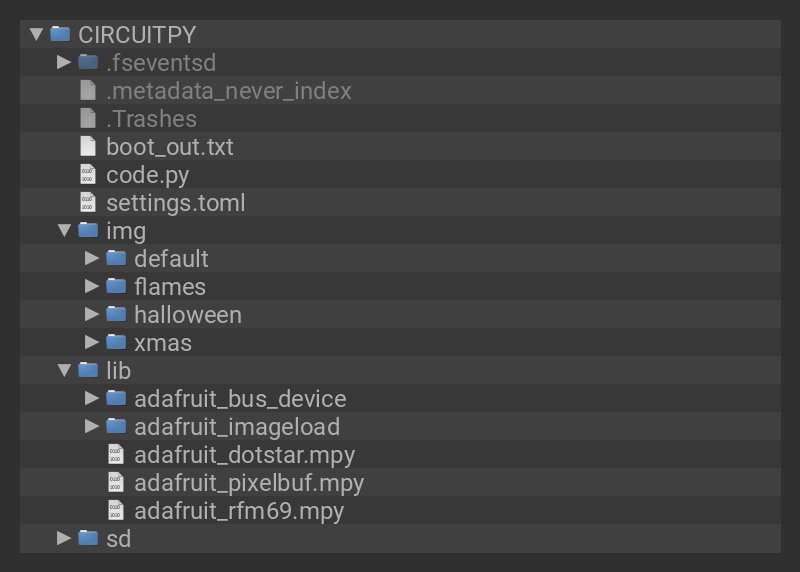
After downloading the Project Bundle, plug your Feather RP2040 RFM69 into the computer's USB port with a known good USB data+power cable. You should see a new flash drive appear in the computer's File Explorer or Finder (depending on your operating system) called CIRCUITPY. Unzip the folder and copy the following items to the Feather RP2040 RFM69's CIRCUITPY drive.
- lib folder
- code.py
- img folder
Your RP2040 RFM69 Feather's CIRCUITPY drive should look like this after copying the lib folder, the img folder, and the code.py file.
Basic Settings
Near the top of the code you’ll find the main settings. You can customize this section to adjust the code to match the number of LEDs in your poi, or the default brightness - currently set to 25 out of 100, which is plenty bright for night time use.
Default_Speed adjusts the number of scanlines. If you find your images are being painted too narrow or too wide based on your preferred spinning speed, adjust this number.
Default_Interval is the number of seconds each image will play before moving to the next image, when autoplay is turned on.
These variables will apply when the poi are in standalone mode (no controller present). When the controller is on, you can adjust speed, brightness, and interval using the touch screen.
NUM_LEDS = 36

IMAGE_ROOT = "/img"
DEFAULT_FOLDER = "default"

ROTATE_IMAGE_180 = True

RADIO_FREQ_MHZ = 915.0

DEFAULT_BRIGHTNESS = 25

DEFAULT_SPEED = 500
DEFAULT_INTERVAL = 8
Add Your Images
The poi look for images inside the /img folder on the CIRCUITPY drive.
Images are organized into subfolders, like this:
CIRCUITPY/
├── code.py
├── lib/
└── img/
    ├── default/
    │   ├── adafruit.bmp
    │   ├── arrows.bmp
    │   └── rainbow.bmp
    ├── halloween/
    │   ├── ghost.bmp
    │   ├── pumpkin.bmp
    │   └── witch.bmp
    ├── flames/
    │   └── ...
    └── xmas/
        └── ...
The guide download includes a collection of ready-to-use images in this same folder structure. Copy the entire img folder onto each poi.
The code automatically finds the folders and sorts the BMP files alphabetically.
The default folder is used at startup. Look for default_folder: "default"in the code to customize this. You can change that to another folder name if you want a different collection to load first.
Image Format
Each POV image must be:
- a .bmp file
- exactly the same height as your LED strip — 36 pixels high for this build
- an indexed/paletted BMP
The width can vary. Wider images contain more POV columns and take a little more memory.
The poi loads one image into memory at a time, converts it into RGB data, and rapidly sends each vertical column to the DotStar strip as you spin the poi.
Matching the Controller
Each poi should have the same folder names and image files as the controller. You can name the folders whatever you'd like as long as the default folder is there. Just make sure the /img folder on the poi matches the /img folder on the controller. The filenames should also match and stay in the same alphabetical order.
The radio does not send the actual image data. Instead, the controller sends the folder name and image number, and each poi loads the matching image from its own local storage.
Standalone or Controller Mode
At startup, the poi briefly listens for the wireless controller.
If it hears the controller, it switches into controller mode and follows commands for:
- image selection
- folder selection
- brightness
- scan speed
- autoplay
- stop/start
If no controller is detected, the poi automatically enters standalone mode and cycles through the images in its local folder.
That means the poi still work as normal POV props even if you don’t bring the controller along.
Page last edited October 07, 2026


