

Controller Software
You can access the code and necessary libraries by downloading the Project Bundle.
To do this, click on the Download Project Bundle button in the window below. It will download to your computer as a zipped folder.
# SPDX-FileCopyrightText: 2026 Erin St Blaine for Adafruit Industries
# SPDX-License-Identifier: MIT
# pylint: disable=too-many-lines,global-statement,redefined-outer-name,too-many-locals,too-many-branches,too-many-statements,too-many-return-statements
"""
Wireless POV Controller
Hardware:
Feather RP2040 RFM69
3.5" TFT FeatherWing V2
TSC2007 touchscreen
Mini I2C Gamepad
Tabs:
PLAY
LIBRARY
SETTINGS
Radio packet:
S,folder,image,running,brightness,speed,auto,interval
PLAY:
Three similarly sized image previews:
PREVIOUS
CURRENT
NEXT
PREVIOUS and NEXT thumbnails are clickable.
Their invisible touch areas are larger than the visible images.
STOP
AUTOPLAY OFF / AUTOPLAY 8s
LIBRARY:
6 thumbnails per page
3 columns x 2 rows
Tap thumbnail to play it on all POIs
Current image gets a cyan border
SETTINGS:
Brightness
Speed
Autoplay interval
Storage:
Controller image library lives on CIRCUITPY at /img/<folder>/.
Folder names and alphabetical BMP order should match the POIs.
RAM strategy:
PLAY thumbnails are unloaded whenever leaving PLAY.
LIBRARY and SETTINGS are generated only when opened.
"""
import gc
import os
import time
import board
import digitalio
import displayio
import terminalio
from micropython import const
import adafruit_hx8357
import adafruit_rfm69
import adafruit_tsc2007
from adafruit_seesaw.seesaw import Seesaw
from adafruit_display_text import label
try:
from fourwire import FourWire
except ImportError:
from displayio import FourWire
# ===========================================================================
# SETTINGS
# ===========================================================================
IMAGE_ROOT = "/img"
DEFAULT_FOLDER = "default"
RADIO_FREQ_MHZ = 915.0
DEFAULT_BRIGHTNESS = 25
DEFAULT_SPEED = 500
DEFAULT_INTERVAL = 8
MIN_SPEED = 100
MAX_SPEED = 1500
COMMAND_REPEATS = 6
COMMAND_REPEAT_DELAY = 0.04
HEARTBEAT_SECONDS = 1.0
TOUCH_MIN = 250
TOUCH_MAX = 3820
LIBRARY_PAGE_SIZE = 6
# ===========================================================================
# COLORS
# ===========================================================================
BG = 0x101825
PANEL = 0x203047
PANEL_ACTIVE = 0x315673
CYAN = 0x28D7E8
WHITE = 0xF0F4FA
MUTED = 0xA7B6C9
GRAY = 0x5A6675
GREEN = 0x19754E
RED = 0xA52D45
BLUE = 0x285C91
# ===========================================================================
# HELPERS
# ===========================================================================
def clamp(value, low, high):
return max(
low,
min(
high,
value,
),
)
# ===========================================================================
# DISPLAY / SPI
# ===========================================================================
displayio.release_displays()
# The RFM69 and TFT share the SPI bus. Keep the radio deselected while
# the display is initialized.
radio_cs = digitalio.DigitalInOut(
board.RFM_CS
)
radio_cs.switch_to_output(
value=True
)
spi = board.SPI()
# ===========================================================================
# DISPLAY
# ===========================================================================
display_bus = FourWire(
spi,
command=board.D10,
chip_select=board.D9,
baudrate=16_000_000,
)
display = adafruit_hx8357.HX8357(
display_bus,
width=480,
height=320,
rotation=0,
)
# ===========================================================================
# TOUCHSCREEN + MINI I2C GAMEPAD
# ===========================================================================
# The TFT touchscreen and Mini I2C Gamepad share the Feather's I2C bus.
i2c_bus = board.STEMMA_I2C()
touchscreen = adafruit_tsc2007.TSC2007(
i2c_bus
)
# Mini I2C Gamepad (Adafruit product 5743 / seesaw address 0x50)
BUTTON_X = const(6)
BUTTON_Y = const(2)
BUTTON_A = const(5)
BUTTON_B = const(1)
BUTTON_SELECT = const(0)
BUTTON_START = const(16)
BUTTON_MASK = const(
(1 << BUTTON_X)
| (1 << BUTTON_Y)
| (1 << BUTTON_A)
| (1 << BUTTON_B)
| (1 << BUTTON_SELECT)
| (1 << BUTTON_START)
)
gamepad = Seesaw(
i2c_bus,
addr=0x50,
)
gamepad.pin_mode_bulk(
BUTTON_MASK,
gamepad.INPUT_PULLUP,
)
gamepad_product = (
gamepad.get_version()
>> 16
) & 0xFFFF
print(
"Gamepad product:",
gamepad_product,
)
# Joystick readings are 0-1023 after reversal. The gamepad is intended to
# be mounted 90 degrees clockwise on the side of the controller.
#
# Physical controls in that mounted orientation:
# LEFT/RIGHT = previous/next image
# UP/DOWN = brightness up/down
#
# If you physically mount the gamepad the opposite way, change this to False.
GAMEPAD_ROTATED_CLOCKWISE = True
JOYSTICK_LOW = 300
JOYSTICK_HIGH = 700
BRIGHTNESS_STEP = 5
# ===========================================================================
# RADIO
# ===========================================================================
radio_reset = digitalio.DigitalInOut(
board.RFM_RST
)
rfm69 = adafruit_rfm69.RFM69(
spi,
radio_cs,
radio_reset,
RADIO_FREQ_MHZ,
)
rfm69.tx_power = 20
print(
"RFM69 ready at",
rfm69.frequency_mhz,
"MHz",
)
print(
"TX power:",
rfm69.tx_power,
"dBm",
)
# ===========================================================================
# FOLDER + IMAGE LIBRARY
# ===========================================================================
def is_directory(path):
"""Return True when path is a directory."""
try:
return bool(
os.stat(path)[0]
& 0x4000
)
except OSError:
return False
def find_folders():
"""Return image-library folders from CIRCUITPY."""
try:
names = os.listdir(
IMAGE_ROOT
)
except OSError as error:
raise RuntimeError(
f"Could not read {IMAGE_ROOT}: {error}"
) from error
found = []
for name in names:
if name.startswith("."):
continue
path = (
IMAGE_ROOT
+ "/"
+ name
)
if is_directory(path):
found.append(
name
)
found.sort()
return found
def folder_path(folder_name):
"""Return the CIRCUITPY path for one image folder."""
return (
IMAGE_ROOT
+ "/"
+ folder_name
)
def find_images_in_folder(folder_name):
"""Return BMP files in one folder, alphabetically."""
path = folder_path(
folder_name
)
try:
names = os.listdir(
path
)
except OSError:
return []
found = []
for name in names:
if name.startswith("."):
continue
if not name.lower().endswith(
".bmp"
):
continue
full_path = (
path
+ "/"
+ name
)
if not is_directory(
full_path
):
found.append(
name
)
found.sort()
return found
folders = find_folders()
if not folders:
raise RuntimeError(
"No image folders found in /img. "
"Create folders such as /img/default and /img/halloween."
)
if DEFAULT_FOLDER in folders:
current_folder = (
DEFAULT_FOLDER
)
else:
current_folder = (
folders[0]
)
IMAGE_DIR = folder_path(
current_folder
)
images = find_images_in_folder(
current_folder
)
if not images:
raise RuntimeError(
f"No BMP images found in {IMAGE_DIR}"
)
print(
"Found folders:",
folders,
)
print(
"Starting folder:",
current_folder,
)
print(
"Controller library:",
len(folders),
"folders,",
len(images),
"images in",
current_folder,
)
# ===========================================================================
# PLAYLIST
# ===========================================================================
# The image index is alphabetical *within the current folder*.
# Every POI should contain the same folder names and matching image order.
image_order = list(
range(
len(images)
)
)
order_position = 0
def set_current_folder(
folder_name
):
"""
Change the controller's active folder.
This only changes what the controller is browsing.
The POIs receive the folder name the next time state is transmitted.
"""
global current_folder
global IMAGE_DIR
global images
global image_order
global order_position
global library_page
if folder_name not in folders:
return False
new_images = (
find_images_in_folder(
folder_name
)
)
if not new_images:
print(
"Folder has no BMP images:",
folder_name,
)
return False
current_folder = (
folder_name
)
IMAGE_DIR = folder_path(
current_folder
)
images = (
new_images
)
image_order = list(
range(
len(images)
)
)
order_position = 0
library_page = 0
print(
"Selected folder:",
current_folder,
"-",
len(images),
"images",
)
return True
def file_index_at(position):
return image_order[
position % len(image_order)
]
def current_file_index():
return file_index_at(
order_position
)
def previous_file_index():
return file_index_at(
order_position - 1
)
def next_file_index():
return file_index_at(
order_position + 1
)
def current_filename():
return images[
current_file_index()
]
# ===========================================================================
# STATE
# ===========================================================================
running = False
autoplay = False
brightness = DEFAULT_BRIGHTNESS
speed = DEFAULT_SPEED
interval = DEFAULT_INTERVAL
last_advance = (
time.monotonic()
)
last_heartbeat = (
time.monotonic()
)
current_tab = "play"
library_page = 0
folder_page = 0
library_mode = "folders"
# ===========================================================================
# DISPLAY HELPERS
# ===========================================================================
root = displayio.Group()
display.root_group = root
def rect(
parent,
x,
y,
width,
height,
color,
):
bitmap = displayio.Bitmap(
width,
height,
1,
)
palette = displayio.Palette(
1
)
palette[0] = color
tile = displayio.TileGrid(
bitmap,
pixel_shader=palette,
x=x,
y=y,
)
parent.append(
tile
)
return (
tile,
palette,
)
def text(
parent,
message,
x,
y,
color=WHITE,
scale=2,
):
item = label.Label(
terminalio.FONT,
text=message,
color=color,
scale=scale,
x=x,
y=y,
)
parent.append(
item
)
return item
def centered_text(
parent,
message,
x,
y,
width,
height,
color=WHITE,
scale=1,
):
item = text(
parent,
message,
0,
0,
color,
scale,
)
item.anchor_point = (
0.5,
0.5,
)
item.anchored_position = (
x + width // 2,
y + height // 2,
)
return item
# Permanent background
rect(
root,
0,
0,
480,
320,
BG,
)
# ===========================================================================
# PAGE GROUPS
# ===========================================================================
play_group = displayio.Group()
root.append(
play_group
)
dynamic_group = displayio.Group()
root.append(
dynamic_group
)
dynamic_buttons = []
# ===========================================================================
# TAB BAR
# ===========================================================================
TAB_Y = 282
TAB_H = 38
tab_buttons = []
def make_tab(
name,
caption,
x,
width,
):
_, palette = rect(
root,
x,
TAB_Y,
width,
TAB_H,
PANEL,
)
centered_text(
root,
caption,
x,
TAB_Y,
width,
TAB_H,
WHITE,
1,
)
tab_buttons.append(
(
name,
x,
TAB_Y,
width,
TAB_H,
palette,
)
)
make_tab(
"play",
"PLAY",
0,
160,
)
make_tab(
"library",
"LIBRARY",
160,
160,
)
make_tab(
"settings",
"SETTINGS",
320,
160,
)
# ===========================================================================
# PLAY TOUCH TARGETS
# ===========================================================================
play_buttons = []
def add_play_touch(
name,
x,
y,
width,
height,
):
play_buttons.append(
(
name,
x,
y,
width,
height,
None,
None,
)
)
def make_play_button(
name,
caption,
x,
y,
width,
height,
color=PANEL,
scale=1,
):
_, palette = rect(
play_group,
x,
y,
width,
height,
color,
)
item = centered_text(
play_group,
caption,
x,
y,
width,
height,
WHITE,
scale,
)
play_buttons.append(
(
name,
x,
y,
width,
height,
palette,
item,
)
)
return (
item,
palette,
)
# ===========================================================================
# PLAY SCREEN
# ===========================================================================
text(
play_group,
"PLAY",
12,
17,
CYAN,
)
text(
play_group,
"RF LIVE",
407,
17,
GREEN,
1,
)
# ---------------------------------------------------------------------------
# THREE IMAGE PREVIEWS
# ---------------------------------------------------------------------------
PREVIEW_Y = 48
PREVIEW_W = 125
PREVIEW_H = 70
PREVIEW_PREV_X = 12
CURRENT_X = 177
PREVIEW_NEXT_X = 342
CURRENT_Y = PREVIEW_Y
CURRENT_W = PREVIEW_W
CURRENT_H = PREVIEW_H
SMALL_Y = PREVIEW_Y
SMALL_W = PREVIEW_W
SMALL_H = PREVIEW_H
# Previous image background
rect(
play_group,
PREVIEW_PREV_X,
PREVIEW_Y,
PREVIEW_W,
PREVIEW_H,
PANEL,
)
# Current image background
rect(
play_group,
CURRENT_X,
CURRENT_Y,
CURRENT_W,
CURRENT_H,
PANEL,
)
# Next image background
rect(
play_group,
PREVIEW_NEXT_X,
PREVIEW_Y,
PREVIEW_W,
PREVIEW_H,
PANEL,
)
# Image groups
previous_preview_group = displayio.Group()
current_preview_group = displayio.Group()
next_preview_group = displayio.Group()
play_group.append(
previous_preview_group
)
play_group.append(
current_preview_group
)
play_group.append(
next_preview_group
)
# ---------------------------------------------------------------------------
# PREVIEW LABELS
# ---------------------------------------------------------------------------
centered_text(
play_group,
"< PREV",
PREVIEW_PREV_X,
122,
PREVIEW_W,
18,
CYAN,
1,
)
current_filename_label = centered_text(
play_group,
"",
CURRENT_X,
122,
CURRENT_W,
18,
WHITE,
1,
)
centered_text(
play_group,
"NEXT >",
PREVIEW_NEXT_X,
122,
PREVIEW_W,
18,
CYAN,
1,
)
# ---------------------------------------------------------------------------
# LARGE INVISIBLE PREV / NEXT TOUCH TARGETS
# ---------------------------------------------------------------------------
# Left 155 pixels of the screen = PREVIOUS.
add_play_touch(
"previous",
0,
36,
155,
110,
)
# Right 155 pixels of the screen = NEXT.
add_play_touch(
"next",
325,
36,
155,
110,
)
# ---------------------------------------------------------------------------
# STOP
# ---------------------------------------------------------------------------
stop_label, stop_palette = make_play_button(
"stop",
"STOP",
170,
158,
140,
48,
RED,
1,
)
# ---------------------------------------------------------------------------
# AUTOPLAY
# ---------------------------------------------------------------------------
auto_label, auto_palette = make_play_button(
"auto",
"AUTOPLAY OFF",
120,
220,
240,
46,
RED,
1,
)
# ===========================================================================
# GENERIC THUMBNAIL CREATOR
# ===========================================================================
def _bmp_u16(data, offset):
"""Read a little-endian unsigned 16-bit value."""
return (
data[offset]
| (
data[offset + 1]
<< 8
)
)
def _bmp_u32(data, offset):
"""Read a little-endian unsigned 32-bit value."""
return (
data[offset]
| (
data[offset + 1]
<< 8
)
| (
data[offset + 2]
<< 16
)
| (
data[offset + 3]
<< 24
)
)
def _bmp_s32(data, offset):
"""Read a little-endian signed 32-bit value."""
value = _bmp_u32(
data,
offset,
)
if value & 0x80000000:
value -= 0x100000000
return value
def create_thumbnail(
parent,
file_index,
box_x,
box_y,
box_width,
box_height,
):
"""
Build a thumbnail directly from an indexed uncompressed BMP on CIRCUITPY.
Unlike adafruit_imageload.load(), this does NOT load the full source
bitmap into RAM. It reads only the BMP header, palette, and one source
row at a time. This keeps six Library thumbnails reliable on RP2040.
"""
filename = images[
file_index
]
path = (
IMAGE_DIR
+ "/"
+ filename
)
gc.collect()
with open(
path,
"rb",
) as bmp_file:
header = bmp_file.read(
54
)
if (
len(header) < 54
or header[0] != 0x42
or header[1] != 0x4D
):
raise ValueError(
"Not a standard BMP file"
)
pixel_offset = _bmp_u32(
header,
10,
)
dib_size = _bmp_u32(
header,
14,
)
source_width = _bmp_s32(
header,
18,
)
raw_height = _bmp_s32(
header,
22,
)
planes = _bmp_u16(
header,
26,
)
bits_per_pixel = _bmp_u16(
header,
28,
)
compression = _bmp_u32(
header,
30,
)
colors_used = _bmp_u32(
header,
46,
)
if (
dib_size < 40
or planes != 1
):
raise ValueError(
"Unsupported BMP header"
)
if bits_per_pixel not in (
1,
4,
8,
):
raise ValueError(
"Thumbnail BMP must be 1-, 4-, or 8-bit indexed"
)
if compression != 0:
raise ValueError(
"Thumbnail BMP must be uncompressed"
)
if (
source_width <= 0
or raw_height == 0
):
raise ValueError(
"Invalid BMP dimensions"
)
source_height = abs(
raw_height
)
bottom_up = (
raw_height > 0
)
# ---------------------------------------------------------------
# THUMBNAIL SIZE
# ---------------------------------------------------------------
if colors_used <= 0:
colors_used = (
1 << bits_per_pixel
)
colors_used = min(
colors_used,
256,
)
usable_width = max(
1,
box_width - 6,
)
usable_height = max(
1,
box_height - 6,
)
# Never enlarge the source. Fit proportionally inside the box.
thumb_width = min(
source_width,
usable_width,
)
thumb_height = max(
1,
(
source_height
* thumb_width
)
// source_width,
)
if thumb_height > usable_height:
thumb_height = (
usable_height
)
thumb_width = max(
1,
(
source_width
* thumb_height
)
// source_height,
)
# Allocate the bitmap BEFORE the palette. The bitmap is the largest
# contiguous block on 256-color images, so doing this first makes
# allocation much less sensitive to heap fragmentation.
gc.collect()
thumbnail = displayio.Bitmap(
thumb_width,
thumb_height,
max(
2,
colors_used,
),
)
# ---------------------------------------------------------------
# PALETTE
# ---------------------------------------------------------------
source_palette = displayio.Palette(
max(
2,
colors_used,
)
)
palette_offset = (
14
+ dib_size
)
bmp_file.seek(
palette_offset
)
for color_index in range(
colors_used
):
entry = bmp_file.read(
4
)
if len(entry) != 4:
raise ValueError(
"BMP palette is truncated"
)
# BMP palette order is B, G, R, reserved.
source_palette[
color_index
] = (
(
entry[2]
<< 16
)
| (
entry[1]
<< 8
)
| entry[0]
)
# BMP rows are padded to a multiple of four bytes.
row_stride = (
(
source_width
* bits_per_pixel
+ 31
)
// 32
) * 4
# ---------------------------------------------------------------
# SAMPLE DIRECTLY FROM THE FILE
# ---------------------------------------------------------------
for y in range(
thumb_height
):
source_y = min(
source_height - 1,
(
y
* source_height
)
// thumb_height,
)
if bottom_up:
file_y = (
source_height
- 1
- source_y
)
else:
file_y = (
source_y
)
bmp_file.seek(
pixel_offset
+ file_y
* row_stride
)
row_data = bmp_file.read(
row_stride
)
if len(row_data) < row_stride:
raise ValueError(
"BMP pixel data is truncated"
)
for x in range(
thumb_width
):
source_x = min(
source_width - 1,
(
x
* source_width
)
// thumb_width,
)
if bits_per_pixel == 8:
pixel_value = (
row_data[
source_x
]
)
elif bits_per_pixel == 4:
packed = (
row_data[
source_x // 2
]
)
if (
source_x % 2
== 0
):
pixel_value = (
packed >> 4
)
else:
pixel_value = (
packed & 0x0F
)
else:
packed = (
row_data[
source_x // 8
]
)
shift = (
7
- (
source_x % 8
)
)
pixel_value = (
packed >> shift
) & 0x01
thumbnail[
x,
y,
] = (
pixel_value
)
gc.collect()
tile = displayio.TileGrid(
thumbnail,
pixel_shader=source_palette,
)
tile.x = (
box_x
+ box_width // 2
- thumb_width // 2
)
tile.y = (
box_y
+ box_height // 2
- thumb_height // 2
)
parent.append(
tile
)
return source_palette
# ===========================================================================
# PLAY PREVIEWS
# ===========================================================================
previous_palette = None
current_palette = None
next_palette = None
def short_current_name():
filename = (
current_filename()
)
if filename.lower().endswith(
".bmp"
):
filename = (
filename[:-4]
)
if len(filename) > 18:
filename = (
filename[:15]
+ "..."
)
return filename
def update_play_previews():
global previous_palette
global current_palette
global next_palette
# -----------------------------------------------------------------------
# REMOVE OLD PREVIEWS
# -----------------------------------------------------------------------
while len(
previous_preview_group
):
previous_preview_group.pop()
while len(
current_preview_group
):
current_preview_group.pop()
while len(
next_preview_group
):
next_preview_group.pop()
previous_palette = None
current_palette = None
next_palette = None
gc.collect()
# -----------------------------------------------------------------------
# UPDATE CURRENT FILENAME
# -----------------------------------------------------------------------
current_filename_label.text = (
short_current_name()
)
# -----------------------------------------------------------------------
# PREVIOUS
# -----------------------------------------------------------------------
try:
previous_palette = (
create_thumbnail(
previous_preview_group,
previous_file_index(),
PREVIEW_PREV_X,
PREVIEW_Y,
PREVIEW_W,
PREVIEW_H,
)
)
except (
OSError,
ValueError,
RuntimeError,
MemoryError,
) as error:
print(
"Previous thumbnail failed:",
error,
)
gc.collect()
# -----------------------------------------------------------------------
# CURRENT
# -----------------------------------------------------------------------
try:
current_palette = (
create_thumbnail(
current_preview_group,
current_file_index(),
CURRENT_X,
CURRENT_Y,
CURRENT_W,
CURRENT_H,
)
)
except (
OSError,
ValueError,
RuntimeError,
MemoryError,
) as error:
print(
"Current thumbnail failed:",
error,
)
gc.collect()
# -----------------------------------------------------------------------
# NEXT
# -----------------------------------------------------------------------
try:
next_palette = (
create_thumbnail(
next_preview_group,
next_file_index(),
PREVIEW_NEXT_X,
PREVIEW_Y,
PREVIEW_W,
PREVIEW_H,
)
)
except (
OSError,
ValueError,
RuntimeError,
MemoryError,
) as error:
print(
"Next thumbnail failed:",
error,
)
gc.collect()
print(
"PLAY previews:",
images[
previous_file_index()
],
"/",
current_filename(),
"/",
images[
next_file_index()
],
)
print(
"Free RAM after PLAY previews:",
gc.mem_free(),
)
# ===========================================================================
# FREE PLAY PREVIEW RAM
# ===========================================================================
def unload_play_previews():
global previous_palette
global current_palette
global next_palette
while len(
previous_preview_group
):
previous_preview_group.pop()
while len(
current_preview_group
):
current_preview_group.pop()
while len(
next_preview_group
):
next_preview_group.pop()
previous_palette = None
current_palette = None
next_palette = None
gc.collect()
print(
"Free RAM after unloading PLAY previews:",
gc.mem_free(),
)
# ===========================================================================
# AUTOPLAY BUTTON
# ===========================================================================
def update_autoplay_button():
if autoplay:
auto_label.text = (
f"AUTOPLAY {interval}s"
)
auto_palette[0] = (
GREEN
)
else:
auto_label.text = (
"AUTOPLAY OFF"
)
auto_palette[0] = (
RED
)
# ===========================================================================
# RADIO
# ===========================================================================
def build_state_message():
# Folder name travels with every state packet, including heartbeats.
# This lets an out-of-range POI resync to the correct folder later.
return (
f"S,{current_folder},{current_file_index()},"
f"{int(running)},{brightness},{speed},"
f"{int(autoplay)},{interval}"
)
def send_state(
repeats=COMMAND_REPEATS
):
message = (
build_state_message()
)
data = message.encode(
"ascii"
)
for repeat in range(
repeats
):
rfm69.send(
data
)
if (
repeat
< repeats - 1
):
time.sleep(
COMMAND_REPEAT_DELAY
)
print(
"RF SEND:",
message,
"x",
repeats,
)
def report_state():
print(
"CONTROLLER:",
current_folder,
"/",
current_filename(),
"running",
running,
"brightness",
brightness,
"speed",
speed,
"auto",
autoplay,
"interval",
interval,
)
# ===========================================================================
# IMAGE CHANGES
# ===========================================================================
def change_image(
amount
):
global order_position
global running
global last_advance
order_position = (
order_position
+ amount
) % len(
image_order
)
running = True
last_advance = (
time.monotonic()
)
if current_tab == "play":
update_play_previews()
report_state()
send_state()
if current_tab == "library":
build_library_page()
def select_file_index(
file_index
):
global order_position
global running
global last_advance
try:
order_position = (
image_order.index(
file_index
)
)
except ValueError:
return
running = True
last_advance = (
time.monotonic()
)
report_state()
send_state()
if current_tab == "library":
build_library_page()
# ===========================================================================
# DYNAMIC PAGE HELPERS
# ===========================================================================
def clear_dynamic():
dynamic_buttons.clear()
while len(
dynamic_group
):
dynamic_group.pop()
gc.collect()
def add_dynamic_button(
name,
caption,
x,
y,
width,
height,
color=PANEL,
scale=1,
):
_, palette = rect(
dynamic_group,
x,
y,
width,
height,
color,
)
item = centered_text(
dynamic_group,
caption,
x,
y,
width,
height,
WHITE,
scale,
)
dynamic_buttons.append(
(
name,
x,
y,
width,
height,
palette,
item,
)
)
# ===========================================================================
# LIBRARY
# ===========================================================================
library_thumbnail_palettes = []
FOLDER_PAGE_SIZE = 6
def library_page_count():
return max(
1,
(
len(images)
+ LIBRARY_PAGE_SIZE
- 1
) // LIBRARY_PAGE_SIZE,
)
def folder_page_count():
return max(
1,
(
len(folders)
+ FOLDER_PAGE_SIZE
- 1
) // FOLDER_PAGE_SIZE,
)
def build_folder_page():
"""Show image-library folders from CIRCUITPY."""
global library_thumbnail_palettes
clear_dynamic()
library_thumbnail_palettes = []
gc.collect()
text(
dynamic_group,
"LIBRARY",
12,
17,
CYAN,
)
text(
dynamic_group,
"CHOOSE FOLDER",
105,
17,
WHITE,
1,
)
total_pages = (
folder_page_count()
)
text(
dynamic_group,
f"{folder_page + 1}/{total_pages}",
440,
17,
MUTED,
1,
)
start = (
folder_page
* FOLDER_PAGE_SIZE
)
end = min(
start
+ FOLDER_PAGE_SIZE,
len(folders),
)
column_x = (
12,
246,
)
row_y = (
52,
112,
172,
)
for slot, folder_index in enumerate(
range(
start,
end,
)
):
row = (
slot // 2
)
column = (
slot % 2
)
folder_name = (
folders[
folder_index
]
)
caption = (
folder_name.upper()
)
if len(caption) > 22:
caption = (
caption[:19]
+ "..."
)
color = (
PANEL_ACTIVE
if folder_name
== current_folder
else PANEL
)
add_dynamic_button(
f"folder_{folder_index}",
caption,
column_x[
column
],
row_y[
row
],
222,
46,
color,
1,
)
add_dynamic_button(
"folder_prev_page",
"< PAGE",
12,
244,
105,
30,
PANEL,
1,
)
centered_text(
dynamic_group,
f"{folder_page + 1} / {total_pages}",
175,
244,
130,
30,
MUTED,
1,
)
add_dynamic_button(
"folder_next_page",
"PAGE >",
363,
244,
105,
30,
PANEL,
1,
)
gc.collect()
def build_image_library_page():
"""Show thumbnails inside the currently selected folder."""
global library_thumbnail_palettes
clear_dynamic()
library_thumbnail_palettes = []
gc.collect()
print(
"Free RAM before Library:",
gc.mem_free(),
)
text(
dynamic_group,
"LIBRARY",
12,
17,
CYAN,
)
folder_caption = (
current_folder.upper()
)
if len(folder_caption) > 22:
folder_caption = (
folder_caption[:19]
+ "..."
)
text(
dynamic_group,
folder_caption,
105,
17,
WHITE,
1,
)
total_pages = (
library_page_count()
)
text(
dynamic_group,
f"{library_page + 1}/{total_pages}",
440,
17,
MUTED,
1,
)
CELL_W = 152
CELL_H = 88
# Six thumbnails stay resident at once. Keep these modest so all six
# fit comfortably in RP2040 RAM even for 256-color source BMPs.
THUMB_W = 84
THUMB_H = 36
COLUMN_X = (
2,
164,
326,
)
ROW_Y = (
45,
139,
)
start = (
library_page
* LIBRARY_PAGE_SIZE
)
end = min(
start
+ LIBRARY_PAGE_SIZE,
len(images),
)
for slot, file_index in enumerate(
range(
start,
end,
)
):
row = (
slot // 3
)
column = (
slot % 3
)
cell_x = (
COLUMN_X[
column
]
)
cell_y = (
ROW_Y[
row
]
)
selected = (
file_index
== current_file_index()
)
thumb_x = (
cell_x
+ (
CELL_W
- THUMB_W
)
// 2
)
thumb_y = (
cell_y
+ 8
)
if selected:
border_x = (
thumb_x - 3
)
border_y = (
thumb_y - 3
)
border_w = (
THUMB_W + 6
)
border_h = (
THUMB_H + 6
)
rect(
dynamic_group,
border_x,
border_y,
border_w,
3,
CYAN,
)
rect(
dynamic_group,
border_x,
border_y
+ border_h
- 3,
border_w,
3,
CYAN,
)
rect(
dynamic_group,
border_x,
border_y,
3,
border_h,
CYAN,
)
rect(
dynamic_group,
border_x
+ border_w
- 3,
border_y,
3,
border_h,
CYAN,
)
try:
palette = (
create_thumbnail(
dynamic_group,
file_index,
thumb_x,
thumb_y,
THUMB_W,
THUMB_H,
)
)
library_thumbnail_palettes.append(
palette
)
except (
OSError,
ValueError,
RuntimeError,
MemoryError,
) as error:
print(
"Library thumbnail failed:",
images[
file_index
],
error,
)
# Lightweight fallback: keep the slot useful even when
# the actual thumbnail cannot allocate.
fallback_name = images[
file_index
]
if fallback_name.lower().endswith(
".bmp"
):
fallback_name = (
fallback_name[:-4]
)
if len(fallback_name) > 14:
fallback_name = (
fallback_name[:11]
+ "..."
)
centered_text(
dynamic_group,
fallback_name,
thumb_x,
thumb_y,
THUMB_W,
THUMB_H,
MUTED,
1,
)
gc.collect()
dynamic_buttons.append(
(
f"library_image_{file_index}",
cell_x,
cell_y,
CELL_W,
CELL_H,
None,
None,
)
)
# Previous page: gray and inactive on the first page.
if library_page > 0:
add_dynamic_button(
"library_prev_page",
"< PAGE",
12,
244,
105,
30,
PANEL,
1,
)
else:
rect(
dynamic_group,
12,
244,
105,
30,
GRAY,
)
centered_text(
dynamic_group,
"< PAGE",
12,
244,
105,
30,
MUTED,
1,
)
add_dynamic_button(
"library_back",
"FOLDERS",
175,
244,
130,
30,
BLUE,
1,
)
# Next page: gray and inactive on the last page.
if library_page < total_pages - 1:
add_dynamic_button(
"library_next_page",
"PAGE >",
363,
244,
105,
30,
PANEL,
1,
)
else:
rect(
dynamic_group,
363,
244,
105,
30,
GRAY,
)
centered_text(
dynamic_group,
"PAGE >",
363,
244,
105,
30,
MUTED,
1,
)
gc.collect()
print(
"Free RAM after Library:",
gc.mem_free(),
)
def build_library_page():
if library_mode == "folders":
build_folder_page()
else:
build_image_library_page()
# ===========================================================================
# SETTINGS
# ===========================================================================
BRIGHT_SLIDER_X = 150
BRIGHT_SLIDER_Y = 70
BRIGHT_SLIDER_W = 260
SPEED_SLIDER_X = 150
SPEED_SLIDER_Y = 135
SPEED_SLIDER_W = 260
def build_settings_page():
clear_dynamic()
gc.collect()
text(
dynamic_group,
"SETTINGS",
12,
17,
CYAN,
)
# -----------------------------------------------------------------------
# BRIGHTNESS
# -----------------------------------------------------------------------
text(
dynamic_group,
"Brightness",
12,
75,
WHITE,
1,
)
rect(
dynamic_group,
BRIGHT_SLIDER_X,
BRIGHT_SLIDER_Y,
BRIGHT_SLIDER_W,
8,
PANEL,
)
bright_x = (
BRIGHT_SLIDER_X
+ brightness
* BRIGHT_SLIDER_W
// 100
)
rect(
dynamic_group,
bright_x - 5,
BRIGHT_SLIDER_Y - 7,
10,
22,
CYAN,
)
text(
dynamic_group,
f"{brightness}%",
425,
75,
CYAN,
1,
)
# -----------------------------------------------------------------------
# SPEED
# -----------------------------------------------------------------------
text(
dynamic_group,
"Speed",
12,
140,
WHITE,
1,
)
rect(
dynamic_group,
SPEED_SLIDER_X,
SPEED_SLIDER_Y,
SPEED_SLIDER_W,
8,
PANEL,
)
speed_x = (
SPEED_SLIDER_X
+ (
speed
- MIN_SPEED
)
* SPEED_SLIDER_W
// (
MAX_SPEED
- MIN_SPEED
)
)
rect(
dynamic_group,
speed_x - 5,
SPEED_SLIDER_Y - 7,
10,
22,
CYAN,
)
text(
dynamic_group,
str(
speed
),
425,
140,
CYAN,
1,
)
text(
dynamic_group,
"columns/sec",
12,
158,
MUTED,
1,
)
# -----------------------------------------------------------------------
# AUTOPLAY INTERVAL
# -----------------------------------------------------------------------
text(
dynamic_group,
"Image interval",
12,
213,
WHITE,
1,
)
add_dynamic_button(
"interval_minus",
"-",
170,
190,
50,
48,
PANEL,
2,
)
text(
dynamic_group,
f"{interval} sec",
245,
215,
CYAN,
2,
)
add_dynamic_button(
"interval_plus",
"+",
350,
190,
50,
48,
PANEL,
2,
)
gc.collect()
print(
"Free RAM after Settings:",
gc.mem_free(),
)
# ===========================================================================
# TAB MANAGEMENT
# ===========================================================================
def update_tab_colors():
for (
name,
_x,
_y,
_w,
_h,
palette,
) in tab_buttons:
palette[0] = (
PANEL_ACTIVE
if name
== current_tab
else PANEL
)
def show_tab(
tab_name
):
global current_tab
global library_thumbnail_palettes
# -----------------------------------------------------------------------
# LEAVING PLAY
# -----------------------------------------------------------------------
if (
current_tab == "play"
and
tab_name != "play"
):
unload_play_previews()
current_tab = (
tab_name
)
update_tab_colors()
# -----------------------------------------------------------------------
# PLAY
# -----------------------------------------------------------------------
if current_tab == "play":
clear_dynamic()
library_thumbnail_palettes = []
play_group.hidden = (
False
)
gc.collect()
update_play_previews()
update_autoplay_button()
gc.collect()
print(
"Free RAM after returning to PLAY:",
gc.mem_free(),
)
# -----------------------------------------------------------------------
# LIBRARY
# -----------------------------------------------------------------------
elif current_tab == "library":
play_group.hidden = (
True
)
build_library_page()
# -----------------------------------------------------------------------
# SETTINGS
# -----------------------------------------------------------------------
elif current_tab == "settings":
play_group.hidden = (
True
)
library_thumbnail_palettes = []
build_settings_page()
# ===========================================================================
# SETTINGS INPUT
# ===========================================================================
def set_brightness_from_x(
x
):
global brightness
fraction = (
clamp(
x
- BRIGHT_SLIDER_X,
0,
BRIGHT_SLIDER_W,
)
/ BRIGHT_SLIDER_W
)
value = int(
round(
fraction
* 100
/ 5
)
* 5
)
brightness = clamp(
value,
0,
100,
)
def set_speed_from_x(
x
):
global speed
fraction = (
clamp(
x
- SPEED_SLIDER_X,
0,
SPEED_SLIDER_W,
)
/ SPEED_SLIDER_W
)
value = (
MIN_SPEED
+ fraction
* (
MAX_SPEED
- MIN_SPEED
)
)
value = int(
round(
value
/ 25
)
* 25
)
speed = clamp(
value,
MIN_SPEED,
MAX_SPEED,
)
# ===========================================================================
# TOUCH
# ===========================================================================
def read_touch():
if not touchscreen.touched:
return None
point = (
touchscreen.touch
)
if point is None:
return None
x = (
point["y"]
- TOUCH_MIN
) * 479 // (
TOUCH_MAX
- TOUCH_MIN
)
y = (
4096
- point["x"]
- TOUCH_MIN
) * 319 // (
TOUCH_MAX
- TOUCH_MIN
)
return (
clamp(
x,
0,
479,
),
clamp(
y,
0,
319,
),
)
def button_hit(
registry,
x,
y,
):
for (
name,
bx,
by,
width,
height,
_palette,
_item,
) in registry:
if (
bx <= x
< bx + width
and
by <= y
< by + height
):
return name
return None
def hit_test(
x,
y,
):
# -----------------------------------------------------------------------
# TABS FIRST
# -----------------------------------------------------------------------
for (
name,
bx,
by,
width,
height,
_palette,
) in tab_buttons:
if (
bx <= x
< bx + width
and
by <= y
< by + height
):
return (
"tab",
name,
)
# -----------------------------------------------------------------------
# PLAY BUTTONS / THUMBNAILS
# -----------------------------------------------------------------------
if current_tab == "play":
name = button_hit(
play_buttons,
x,
y,
)
if name:
return (
"button",
name,
)
# -----------------------------------------------------------------------
# DYNAMIC BUTTONS
# -----------------------------------------------------------------------
else:
name = button_hit(
dynamic_buttons,
x,
y,
)
if name:
return (
"button",
name,
)
# -----------------------------------------------------------------------
# SETTINGS SLIDERS
# -----------------------------------------------------------------------
if current_tab == "settings":
if (
BRIGHT_SLIDER_X - 15
<= x
<= BRIGHT_SLIDER_X
+ BRIGHT_SLIDER_W
+ 15
and
BRIGHT_SLIDER_Y - 20
<= y
<= BRIGHT_SLIDER_Y + 25
):
return (
"slider",
"brightness",
)
if (
SPEED_SLIDER_X - 15
<= x
<= SPEED_SLIDER_X
+ SPEED_SLIDER_W
+ 15
and
SPEED_SLIDER_Y - 20
<= y
<= SPEED_SLIDER_Y + 25
):
return (
"slider",
"speed",
)
return (
"none",
None,
)
# ===========================================================================
# BUTTON ACTIONS
# ===========================================================================
def do_button(
name
):
global running
global autoplay
global interval
global library_page
global folder_page
global library_mode
global last_advance
# -----------------------------------------------------------------------
# PREVIOUS
# -----------------------------------------------------------------------
if name == "previous":
change_image(
-1
)
return
# -----------------------------------------------------------------------
# NEXT
# -----------------------------------------------------------------------
if name == "next":
change_image(
1
)
return
# -----------------------------------------------------------------------
# STOP
# -----------------------------------------------------------------------
if name == "stop":
running = False
report_state()
send_state()
return
# -----------------------------------------------------------------------
# AUTOPLAY
# -----------------------------------------------------------------------
if name == "auto":
autoplay = (
not autoplay
)
last_advance = (
time.monotonic()
)
update_autoplay_button()
report_state()
send_state()
return
# -----------------------------------------------------------------------
# FOLDER SELECTION
# -----------------------------------------------------------------------
if name.startswith(
"folder_"
) and name not in (
"folder_prev_page",
"folder_next_page",
):
try:
folder_index = int(
name.split(
"_"
)[-1]
)
except ValueError:
return
if (
0
<= folder_index
< len(folders)
):
if set_current_folder(
folders[
folder_index
]
):
library_mode = (
"images"
)
build_library_page()
return
if name == "folder_prev_page":
folder_page = max(
0,
folder_page - 1,
)
build_library_page()
return
if name == "folder_next_page":
folder_page = min(
folder_page_count() - 1,
folder_page + 1,
)
build_library_page()
return
if name == "library_back":
library_mode = (
"folders"
)
build_library_page()
return
# -----------------------------------------------------------------------
# LIBRARY IMAGE
# -----------------------------------------------------------------------
if name.startswith(
"library_image_"
):
try:
file_index = int(
name.split(
"_"
)[-1]
)
except ValueError:
return
select_file_index(
file_index
)
return
# -----------------------------------------------------------------------
# LIBRARY PREVIOUS PAGE
# -----------------------------------------------------------------------
if name == "library_prev_page":
new_page = max(
0,
library_page - 1,
)
if new_page != library_page:
library_page = (
new_page
)
build_library_page()
return
# -----------------------------------------------------------------------
# LIBRARY NEXT PAGE
# -----------------------------------------------------------------------
if name == "library_next_page":
new_page = min(
library_page_count() - 1,
library_page + 1,
)
if new_page != library_page:
library_page = (
new_page
)
build_library_page()
return
# -----------------------------------------------------------------------
# INTERVAL -
# -----------------------------------------------------------------------
if name == "interval_minus":
interval = max(
1,
interval - 1,
)
last_advance = (
time.monotonic()
)
build_settings_page()
update_autoplay_button()
report_state()
send_state()
return
# -----------------------------------------------------------------------
# INTERVAL +
# -----------------------------------------------------------------------
if name == "interval_plus":
interval = min(
60,
interval + 1,
)
last_advance = (
time.monotonic()
)
build_settings_page()
update_autoplay_button()
report_state()
send_state()
return
# ===========================================================================
# GAMEPAD INPUT
# ===========================================================================
def gamepad_joystick_direction():
"""Return one physical joystick direction, or None in the dead zone."""
# Reverse the seesaw values so normal board orientation is:
# left/down = 0 and right/up = 1023.
joy_x = (
1023
- gamepad.analog_read(14)
)
joy_y = (
1023
- gamepad.analog_read(15)
)
if GAMEPAD_ROTATED_CLOCKWISE:
# Board rotated 90 degrees clockwise:
# original left -> physical up
# original right -> physical down
# original down -> physical left
# original up -> physical right
if joy_x < JOYSTICK_LOW:
return "up"
if joy_x > JOYSTICK_HIGH:
return "down"
if joy_y < JOYSTICK_LOW:
return "left"
if joy_y > JOYSTICK_HIGH:
return "right"
else:
# Same board mounted 90 degrees counter-clockwise.
if joy_x > JOYSTICK_HIGH:
return "up"
if joy_x < JOYSTICK_LOW:
return "down"
if joy_y > JOYSTICK_HIGH:
return "left"
if joy_y < JOYSTICK_LOW:
return "right"
return None
def change_brightness_from_gamepad(amount):
"""Change brightness in 5% steps and immediately transmit it."""
global brightness
new_brightness = clamp(
brightness + amount,
0,
100,
)
if new_brightness == brightness:
return
brightness = new_brightness
if current_tab == "settings":
build_settings_page()
report_state()
send_state()
def gamepad_change_image(amount):
"""Change image, transmit it, and keep the Library page on the selection."""
global library_page
change_image(amount)
if (
current_tab == "library"
and library_mode == "images"
):
new_page = (
current_file_index()
// LIBRARY_PAGE_SIZE
)
if new_page != library_page:
library_page = new_page
build_library_page()
def gamepad_button_action(button_pin):
"""Handle one newly pressed physical gamepad button."""
if button_pin == BUTTON_X:
# Next image, same as joystick right.
gamepad_change_image(1)
return
if button_pin == BUTTON_B:
# Previous image, same as joystick left.
gamepad_change_image(-1)
return
if button_pin == BUTTON_Y:
# Toggle autoplay on/off.
do_button("auto")
return
if button_pin == BUTTON_A:
# Stop the POI display.
do_button("stop")
return
# START and SELECT are intentionally unused for now.
# ===========================================================================
# STARTUP
# ===========================================================================
print()
print(
"POI CONTROLLER"
)
print(
"Found",
len(images),
"BMP images",
)
print(
"Free RAM before UI:",
gc.mem_free(),
)
update_play_previews()
update_autoplay_button()
update_tab_colors()
play_group.hidden = (
False
)
report_state()
print(
"Free RAM after PLAY UI:",
gc.mem_free(),
)
send_state()
# ===========================================================================
# TOUCH STATE
# ===========================================================================
active_type = None
active_name = None
last_seen = 0
slider_changed = False
# Gamepad edge/latch state. Buttons act once per press and the joystick acts
# once per deflection, then must return to center before another action.
last_gamepad_pressed = 0
joystick_latched = False
# ===========================================================================
# MAIN LOOP
# ===========================================================================
while True:
now = (
time.monotonic()
)
# -----------------------------------------------------------------------
# MINI I2C GAMEPAD
# -----------------------------------------------------------------------
# Buttons are active-low. Trigger each action only on a new press.
raw_buttons = gamepad.digital_read_bulk(
BUTTON_MASK
)
gamepad_pressed = (
(~raw_buttons)
& BUTTON_MASK
)
new_button_presses = (
gamepad_pressed
& ~last_gamepad_pressed
)
if new_button_presses:
for button_pin in (
BUTTON_Y,
BUTTON_A,
BUTTON_B,
BUTTON_X,
BUTTON_SELECT,
BUTTON_START,
):
if new_button_presses & (
1 << button_pin
):
gamepad_button_action(
button_pin
)
last_gamepad_pressed = (
gamepad_pressed
)
# One joystick action per deflection. It must return to center first.
joy_direction = (
gamepad_joystick_direction()
)
if joy_direction is None:
joystick_latched = False
elif not joystick_latched:
joystick_latched = True
if joy_direction == "up":
# Physical joystick up = brightness up.
change_brightness_from_gamepad(
BRIGHTNESS_STEP
)
elif joy_direction == "down":
# Physical joystick down = brightness down.
change_brightness_from_gamepad(
-BRIGHTNESS_STEP
)
elif joy_direction == "left":
# Physical joystick left = previous image.
gamepad_change_image(-1)
elif joy_direction == "right":
# Physical joystick right = next image.
gamepad_change_image(1)
point = (
read_touch()
)
# -----------------------------------------------------------------------
# TOUCH RELEASE
# -----------------------------------------------------------------------
if point is None:
if (
active_type is not None
and
now - last_seen > 0.12
):
if (
active_type == "slider"
and
slider_changed
):
update_autoplay_button()
report_state()
send_state()
active_type = None
active_name = None
slider_changed = False
# -----------------------------------------------------------------------
# TOUCH ACTIVE
# -----------------------------------------------------------------------
else:
last_seen = (
now
)
x, y = (
point
)
# -------------------------------------------------------------------
# NEW TOUCH
# -------------------------------------------------------------------
if active_type is None:
active_type, active_name = (
hit_test(
x,
y,
)
)
slider_changed = False
# ---------------------------------------------------------------
# TAB
# ---------------------------------------------------------------
if active_type == "tab":
show_tab(
active_name
)
# ---------------------------------------------------------------
# BUTTON
# ---------------------------------------------------------------
elif active_type == "button":
do_button(
active_name
)
# ---------------------------------------------------------------
# SLIDER
# ---------------------------------------------------------------
elif active_type == "slider":
old_brightness = (
brightness
)
old_speed = (
speed
)
if active_name == "brightness":
set_brightness_from_x(
x
)
elif active_name == "speed":
set_speed_from_x(
x
)
if (
brightness
!= old_brightness
or
speed
!= old_speed
):
slider_changed = (
True
)
build_settings_page()
# -------------------------------------------------------------------
# HELD SLIDER
# -------------------------------------------------------------------
elif active_type == "slider":
old_brightness = (
brightness
)
old_speed = (
speed
)
if active_name == "brightness":
set_brightness_from_x(
x
)
elif active_name == "speed":
set_speed_from_x(
x
)
if (
brightness
!= old_brightness
or
speed
!= old_speed
):
slider_changed = (
True
)
build_settings_page()
# -----------------------------------------------------------------------
# AUTOPLAY
# -----------------------------------------------------------------------
if (
running
and
autoplay
and
len(image_order) > 1
and
active_type is None
and
(
now
- last_advance
>= interval
)
):
order_position = (
order_position + 1
) % len(
image_order
)
last_advance = (
time.monotonic()
)
# Update only the visible page.
if current_tab == "play":
update_play_previews()
elif current_tab == "library":
build_library_page()
report_state()
send_state()
# -----------------------------------------------------------------------
# HEARTBEAT
# -----------------------------------------------------------------------
if (
now
- last_heartbeat
>= HEARTBEAT_SECONDS
):
last_heartbeat = (
now
)
send_state(
repeats=1
)
time.sleep(
0.02
)
Upload the Code and Libraries to the RP2040 RFM69 Feather
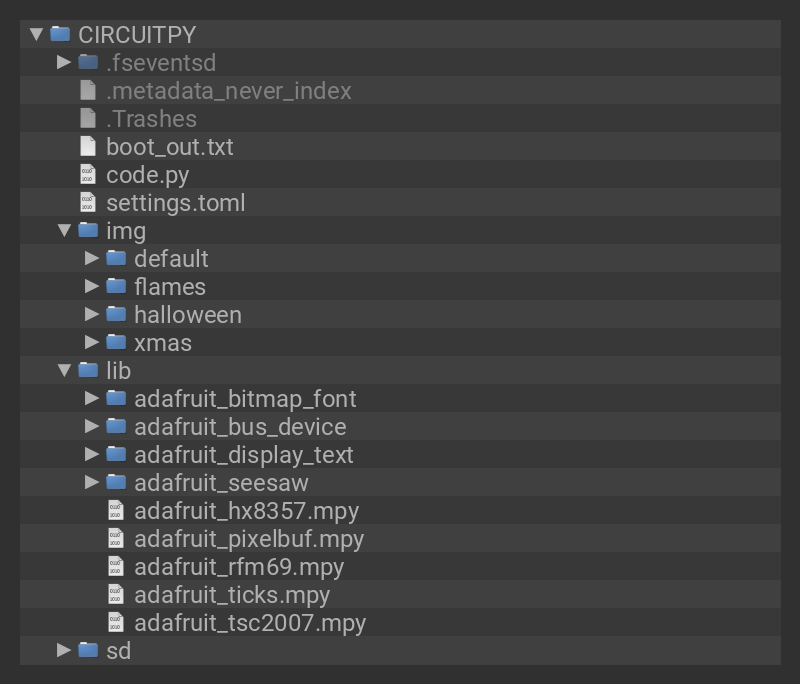
After downloading the Project Bundle, plug your Feather RP2040 RFM69 into the computer's USB port with a known good USB data+power cable. You should see a new flash drive appear in the computer's File Explorer or Finder (depending on your operating system) called CIRCUITPY. Unzip the folder and copy the following items to the Feather RP2040 RFM69's CIRCUITPY drive.
- lib folder
- code.py
- img folder
Your RP2040 RFM69 Feather's CIRCUITPY drive should look like this after copying the lib folder, the img folder, and the code.py file.
Controller Software
The controller runs on an Adafruit Feather RP2040 RFM69 plugged into the 3.5" TFT FeatherWing. It uses the touchscreen and Mini I2C Gamepad to browse your image library and send commands wirelessly to all of the poi.
The controller does not transmit the actual image files over the radio. Instead, it keeps its own copy of the same image library that is stored on each poi. When you select an image, the controller sends the folder name, image number, brightness, scan speed, and playback settings. Each poi then loads the matching image from its own CIRCUITPY drive.
Controller Settings
Near the beginning of the code are the main settings you may want to customize:
IMAGE_ROOT = "/img"
DEFAULT_FOLDER = "default"

DEFAULT_BRIGHTNESS = 25
DEFAULT_SPEED = 500
DEFAULT_INTERVAL = 8

RADIO_FREQ_MHZ = 915.0
DEFAULT_FOLDER sets which image folder is selected when the controller starts. You can name your folders anything you like; just make sure the folder named here exists on the controller and on each poi.
DEFAULT_BRIGHTNESS sets the starting LED brightness as a percentage. The example uses 25%.
DEFAULT_SPEED sets the starting POV scan rate in columns per second. The example uses 500 columns per second.
DEFAULT_INTERVAL sets the number of seconds between images when Autoplay is turned on.
The brightness, scan rate, and autoplay interval can all be changed later from the controller interface.

Add the Image Library
Create an /img folder on the controller's CIRCUITPY drive and copy your image folders into it.
For example, your image library might contain folders called default, fire, holiday, logos, or anything else that makes sense for your show.
The folder names and image files on the controller should match the files on every poi. This is important because the controller sends the folder name and the position of the selected image rather than sending the BMP itself. Images inside each folder are sorted alphabetically, so keep the same filenames on every device.
Wireless Control
Whenever you select an image or change a setting, the controller sends the updated state several times over the RFM69 radio. It also sends a periodic heartbeat so poi that temporarily move out of range can resynchronize when they come back.
This makes the system fairly forgiving during a performance. If a poi misses one transmission, it will usually catch the next repeated command or heartbeat and update itself automatically.
The controller can operate multiple poi at once, as long as all of them contain the same image library.
Page last edited October 07, 2026


