

Code
You can access the code and necessary libraries by downloading the Project Bundle.
To do this, click on the Download Project Bundle button in the window below. It will download to your computer as a zipped folder.
# SPDX-FileCopyrightText: 2026 Erin St Blaine for Adafruit Industries
#
# SPDX-License-Identifier: MIT

"""Motion-reactive LED hair falls for the RP2040 Prop-Maker Feather."""

import math
import random
import time

import adafruit_lis3dh
import board
import digitalio
import neopixel


# Pixel layout
PIXELS_PER_STRAND = 20
BRIGHTNESS = 1.0

LEFT_PINS = (board.D5, board.D6, board.D9)
RIGHT_PINS = (board.D10, board.D11, board.D12)
STRAND_COUNT = len(LEFT_PINS) + len(RIGHT_PINS)

LEFT_START = 0
LEFT_END = 9
RIGHT_START = 3
RIGHT_END = 12
HEADBAND_END = 2

# Shake detection
LIGHT_SHAKE = 0.60
HARD_SHAKE = 1.25
SHAKE_COOLDOWN = 0.35
MIN_RAIN_DURATION = 2.5
MAX_RAIN_DURATION = 3.5

# Lightning
LIGHTNING_THRESHOLD = 0.72
LIGHTNING_FLASH_1 = 0.10
LIGHTNING_GAP = 0.08
LIGHTNING_FLASH_2 = 0.16
LIGHTNING_GAP_2 = 0.05
LIGHTNING_FLASH_3 = 0.22

# Rain
LIGHT_DROP_SPEED = 4.0
HARD_DROP_SPEED = 16.0
SPEED_VARIATION = 0.35
HARD_SPAWN_MIN = 0.05
HARD_SPAWN_MAX = 0.14
MAX_DROPS_PER_STRAND = 5
GENTLE_MODE_THRESHOLD = 0.45
GENTLE_SPAWN_MIN = 0.35
GENTLE_SPAWN_MAX = 0.90

# Colors
TOP_COLOR = (35, 3, 55)
BOTTOM_COLOR = (0, 20, 55)
HEADBAND_COLOR = (25, 3, 40)

DRIP_COLORS = (
    (255, 255, 255),
    (100, 210, 255),
    (30, 90, 220),
    (8, 25, 90),
)

WHITE = (255, 255, 255)
BLACK = (0, 0, 0)


def clamp(value, low, high):
    """Limit value to the supplied range."""
    return max(low, min(high, value))


def lerp(start, end, amount):
    """Linearly interpolate between two values."""
    return start + (end - start) * amount


def blend(color_1, color_2, amount):
    """Blend between two RGB colors."""
    return tuple(
        int(
            color_1[channel]
            + (color_2[channel] - color_1[channel]) * amount
        )
        for channel in range(3)
    )


def add_colors(base, overlay):
    """Add two RGB colors, clamping each channel to 255."""
    return tuple(
        min(255, base[channel] + overlay[channel])
        for channel in range(3)
    )


def make_strands(pins):
    """Create one NeoPixel object for each data pin."""
    strands = []

    for pin in pins:
        strip = neopixel.NeoPixel(
            pin,
            PIXELS_PER_STRAND,
            brightness=BRIGHTNESS,
            auto_write=False,
        )

        strip.fill(BLACK)
        strip.show()
        strands.append(strip)

    return strands


def draw_gradient(strip, start, end):
    """Draw the base purple-to-blue gradient on one strand."""
    length = end - start

    for pixel in range(start, end + 1):
        amount = (pixel - start) / length
        strip[pixel] = blend(
            TOP_COLOR,
            BOTTOM_COLOR,
            amount,
        )


def draw_left_base(strip):
    """Draw the base effect on a left-side strand."""
    strip.fill(BLACK)
    draw_gradient(
        strip,
        LEFT_START,
        LEFT_END,
    )


def draw_right_base(strip):
    """Draw the base effect on a right-side strand."""
    strip.fill(BLACK)

    for pixel in range(HEADBAND_END + 1):
        strip[pixel] = HEADBAND_COLOR

    draw_gradient(
        strip,
        RIGHT_START,
        RIGHT_END,
    )


def show_base(left_strands, right_strands):
    """Redraw the resting look on all six strands."""
    for strip in left_strands:
        draw_left_base(strip)
        strip.show()

    for strip in right_strands:
        draw_right_base(strip)
        strip.show()


def fill_all(strands, color):
    """Fill and show all strands with one color."""
    for strip in strands:
        strip.fill(color)
        strip.show()


def show_lightning(left_strands, right_strands):
    """Play a three-flash lightning effect."""
    all_strands = left_strands + right_strands

    fill_all(all_strands, WHITE)
    time.sleep(LIGHTNING_FLASH_1)

    show_base(left_strands, right_strands)
    time.sleep(LIGHTNING_GAP)

    fill_all(all_strands, WHITE)
    time.sleep(LIGHTNING_FLASH_2)

    fill_all(all_strands, BLACK)
    time.sleep(LIGHTNING_GAP_2)

    fill_all(all_strands, WHITE)
    time.sleep(LIGHTNING_FLASH_3)

    show_base(left_strands, right_strands)


def draw_drop(strip, drop, start, end):
    """Draw one bright raindrop with a three-pixel tail."""
    position = int(drop["pos"])

    for offset, color in enumerate(DRIP_COLORS):
        pixel = position - offset

        if start <= pixel <= end:
            strip[pixel] = add_colors(
                strip[pixel],
                color,
            )


def strand_start(index):
    """Return the first animated pixel for a strand index."""
    if index < len(LEFT_PINS):
        return LEFT_START

    return RIGHT_START


def strand_end(index):
    """Return the last animated pixel for a strand index."""
    if index < len(LEFT_PINS):
        return LEFT_END

    return RIGHT_END


def new_drop(start, speed):
    """Create a drop state object."""
    return {
        "pos": float(start),
        "speed": speed,
    }


def setup_accelerometer():
    """Enable Prop-Maker power and return the onboard accelerometer."""
    external_power = digitalio.DigitalInOut(
        board.EXTERNAL_POWER
    )
    external_power.direction = digitalio.Direction.OUTPUT
    external_power.value = True

    i2c = board.I2C()

    accel_interrupt = digitalio.DigitalInOut(
        board.ACCELEROMETER_INTERRUPT
    )

    sensor = adafruit_lis3dh.LIS3DH_I2C(
        i2c,
        int1=accel_interrupt,
    )

    sensor.range = adafruit_lis3dh.RANGE_4_G

    return sensor


def read_acceleration(sensor):
    """Return accelerometer readings normalized to units of gravity."""
    gravity = adafruit_lis3dh.STANDARD_GRAVITY

    return tuple(
        value / gravity
        for value in sensor.acceleration
    )


def calculate_jerk(current_accel, previous_accel):
    """Return change in the acceleration vector since the last reading."""
    deltas = (
        current_accel[index] - previous_accel[index]
        for index in range(3)
    )

    return math.sqrt(
        sum(
            delta * delta
            for delta in deltas
        )
    )


def handle_shake(
    jerk,
    now,
    last_shake_time,
    left_strands,
    right_strands,
):
    """Return updated rain timing and intensity after a valid shake."""
    if (
        jerk < LIGHT_SHAKE
        or now - last_shake_time <= SHAKE_COOLDOWN
    ):
        return None

    intensity = clamp(
        (jerk - LIGHT_SHAKE)
        / (HARD_SHAKE - LIGHT_SHAKE),
        0.0,
        1.0,
    )

    if intensity >= LIGHTNING_THRESHOLD:
        show_lightning(
            left_strands,
            right_strands,
        )

    duration = lerp(
        MIN_RAIN_DURATION,
        MAX_RAIN_DURATION,
        intensity,
    )

    now = time.monotonic()

    return (
        now + duration,
        intensity,
        now,
    )


def spawn_gentle_drop(
    drops,
    drop_speed,
    strand_index,
):
    """Add one gentle drop to a single strand when that strand is free."""
    if drops[strand_index]:
        return False

    speed = drop_speed * random.uniform(
        0.85,
        1.15,
    )

    drops[strand_index].append(
        new_drop(
            strand_start(strand_index),
            speed,
        )
    )

    return True


def spawn_heavy_drops(
    drops,
    next_spawn,
    now,
    drop_speed,
    intensity,
):
    """Spawn independent heavy-rain drops across all six strands."""
    spawn_min = lerp(
        GENTLE_SPAWN_MIN,
        HARD_SPAWN_MIN,
        intensity,
    )

    spawn_max = lerp(
        GENTLE_SPAWN_MAX,
        HARD_SPAWN_MAX,
        intensity,
    )

    for index in range(STRAND_COUNT):
        if (
            now < next_spawn[index]
            or len(drops[index]) >= MAX_DROPS_PER_STRAND
        ):
            continue

        variation = random.uniform(
            1.0 - SPEED_VARIATION,
            1.0 + SPEED_VARIATION,
        )

        drops[index].append(
            new_drop(
                strand_start(index),
                drop_speed * variation,
            )
        )

        next_spawn[index] = (
            now
            + random.uniform(
                spawn_min,
                spawn_max,
            )
        )


def update_drops(drops, delta_time):
    """Advance all active drops and remove drops that leave the strand."""
    for index, strand_drops in enumerate(drops):
        for drop in strand_drops:
            drop["pos"] += (
                drop["speed"] * delta_time
            )

        end = strand_end(index)

        strand_drops[:] = [
            drop
            for drop in strand_drops
            if drop["pos"] <= end + 4
        ]


def draw_frame(
    left_strands,
    right_strands,
    drops,
):
    """Draw the base glow and all active drops."""
    for index, strip in enumerate(left_strands):
        draw_left_base(strip)

        for drop in drops[index]:
            draw_drop(
                strip,
                drop,
                LEFT_START,
                LEFT_END,
            )

        strip.show()

    offset = len(left_strands)

    for index, strip in enumerate(right_strands):
        draw_right_base(strip)

        for drop in drops[index + offset]:
            draw_drop(
                strip,
                drop,
                RIGHT_START,
                RIGHT_END,
            )

        strip.show()


def choose_different_strand(current_index):
    """Choose a strand other than the one just used."""
    choices = [
        index
        for index in range(STRAND_COUNT)
        if index != current_index
    ]

    return random.choice(choices)


def make_state(sensor):
    """Create the mutable animation state."""
    now = time.monotonic()

    return {
        "drops": [
            []
            for _ in range(STRAND_COUNT)
        ],
        "next_spawn": [
            now
            for _ in range(STRAND_COUNT)
        ],
        "rain_until": 0.0,
        "rain_intensity": 0.0,
        "last_shake": 0.0,
        "gentle_strand": random.randrange(
            STRAND_COUNT
        ),
        "gentle_spawn": now,
        "previous_accel": read_acceleration(sensor),
        "last_frame": now,
    }


def process_shake(
    sensor,
    state,
    left_strands,
    right_strands,
    now,
):
    """Read motion and update rain state when a shake is detected."""
    current_accel = read_acceleration(sensor)

    jerk = calculate_jerk(
        current_accel,
        state["previous_accel"],
    )

    state["previous_accel"] = current_accel

    result = handle_shake(
        jerk,
        now,
        state["last_shake"],
        left_strands,
        right_strands,
    )

    if not result:
        return now

    (
        state["rain_until"],
        state["rain_intensity"],
        state["last_shake"],
    ) = result

    state["gentle_strand"] = random.randrange(
        STRAND_COUNT
    )

    state["gentle_spawn"] = state["last_shake"]

    return state["last_shake"]


def spawn_rain(state, now):
    """Spawn gentle or heavy rain according to current intensity."""
    if now >= state["rain_until"]:
        return

    intensity = state["rain_intensity"]

    drop_speed = lerp(
        LIGHT_DROP_SPEED,
        HARD_DROP_SPEED,
        intensity,
    )

    if intensity < GENTLE_MODE_THRESHOLD:
        strand = state["gentle_strand"]

        if now < state["gentle_spawn"]:
            return

        if not spawn_gentle_drop(
            state["drops"],
            drop_speed,
            strand,
        ):
            return

        state["gentle_strand"] = (
            choose_different_strand(strand)
        )

        state["gentle_spawn"] = (
            now
            + random.uniform(
                GENTLE_SPAWN_MIN,
                GENTLE_SPAWN_MAX,
            )
        )

        return

    spawn_heavy_drops(
        state["drops"],
        state["next_spawn"],
        now,
        drop_speed,
        intensity,
    )


def animate_frame(
    sensor,
    state,
    left_strands,
    right_strands,
):
    """Run one animation frame."""
    now = time.monotonic()

    delta_time = max(
        now - state["last_frame"],
        0.001,
    )

    state["last_frame"] = now

    now = process_shake(
        sensor,
        state,
        left_strands,
        right_strands,
        now,
    )

    # process_shake() may block while the lightning effect plays.
    # Reset the frame clock afterward so that delay does not cause
    # active drops to jump forward on the next animation frame.
    state["last_frame"] = now

    spawn_rain(
        state,
        now,
    )

    update_drops(
        state["drops"],
        delta_time,
    )

    draw_frame(
        left_strands,
        right_strands,
        state["drops"],
    )


def main():
    """Run the motion-reactive hair-fall animation."""
    sensor = setup_accelerometer()

    left_strands = make_strands(
        LEFT_PINS
    )

    right_strands = make_strands(
        RIGHT_PINS
    )

    state = make_state(sensor)

    while True:
        animate_frame(
            sensor,
            state,
            left_strands,
            right_strands,
        )

        time.sleep(0.01)


main()
Upload the Code and Libraries to the RP2040 Prop-Maker Feather
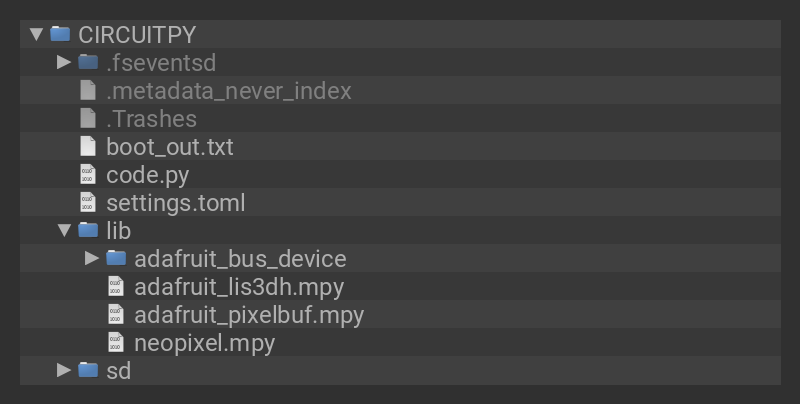
After downloading the Project Bundle, plug your RP2040 Prop-Maker Feather into the computer's USB port with a known good USB data+power cable. You should see a new flash drive appear in the computer's File Explorer or Finder (depending on your operating system) called CIRCUITPY. Unzip the folder and copy the following items to the RP2040 PropMaker Feather's CIRCUITPY drive.
- lib folder
- code.py
Your RP2040 PropMaker Feather CIRCUITPY drive should look like this after copying the lib folder, and the code.py file.
Code Overview
This project uses the Prop-Maker Feather’s onboard accelerometer to detect head movement and trigger animated “rain” effects on your six independently controlled seed-pixel strands.
The code first turns on the Prop-Maker’s external power rail and sets up the six LED strands. The three strands on one side begin their animation at pixel 0, while the three strands on the other side reserve the first three pixels for a steady glow across the top of the headband.
A soft color gradient is drawn along each strand to create the normal resting look. This stays visible underneath the rain animation.
The accelerometer continuously measures movement. The code watches for sudden changes in acceleration: a light shake triggers a gentle rain effect, while a stronger shake increases the speed and density of the drops.
For gentle rain, the code sends drops down one strand at a time, choosing different strands so the effect feels staggered and organic. During heavier rain, all six strands can animate independently at once, with randomized speeds and timing so the drops don’t move in sync.
Strong shakes can also trigger a lightning effect before the rain begins. The code briefly flashes all six strands at full white brightness in a short multi-flash sequence, then returns to the base gradient and starts the downpour.
Change the Colors
The background gradient, headband glow, and raindrop colors are all set near the top of the code:
TOP_COLOR = (35, 3, 55)
BOTTOM_COLOR = (0, 20, 55)

HEADBAND_COLOR = (25, 3, 40)

DRIP_HEAD = (255, 255, 255)
DRIP_TAIL_1 = (100, 210, 255)
DRIP_TAIL_2 = (30, 90, 220)
DRIP_TAIL_3 = (8, 25, 90)
Each color is an RGB tuple in the format (red, green, blue), with each value ranging from 0–255. Get tuples for your favorite colors using a Hex Calculator.
TOP_COLOR and BOTTOM_COLOR create the gradient along the hair falls. HEADBAND_COLOR controls the three steady pixels at the top of the right-side strands. The DRIP_ colors define the bright leading pixel and fading tail of each raindrop.
You can swap these values for any palette you like.
Calibrate the Head Shake
The most important motion settings are:
LIGHT_SHAKE = 0.60
HARD_SHAKE = 1.25

LIGHTNING_THRESHOLD = 0.72

LIGHT_DROP_SPEED = 4.0
HARD_DROP_SPEED = 16.0
LIGHT_SHAKE determines how much movement is required before the rain effect starts. If normal walking or dancing triggers the animation too easily, increase this number. If you have to shake your head too hard, lower it.
HARD_SHAKE defines the upper end of the motion range. As your shake gets stronger, the rain becomes faster and denser.
LIGHTNING_THRESHOLD controls how strong the shake must be before the lightning effect is added. Lower this number to make lightning easier to trigger, or raise it to reserve lightning for more dramatic movement.
LIGHT_DROP_SPEED and HARD_DROP_SPEED control how quickly the drops move during gentle and intense rain.
Because each strand is connected to its own GPIO pin, the drops can move independently. Gentle movement creates staggered drops on individual strands, while a stronger shake creates a much more energetic rainstorm across all six strands.
For most builds, these color and motion settings are all you'll need to change.
Page last edited October 05, 2026


