

Playback Using Fruit Jam
The Fruit Jam is an all-in-one board with an RP2350 microcontroller and a TLV320DAC3100 DAC built-in. This makes it ideal for audio playback.
Connect headphones to the stereo headphone jack.
For each type of file for playback (FLAC or Ogg), click the Download Project Bundle button below to download the necessary libraries and the code.py file as a zip file.
# SPDX-FileCopyrightText: Copyright (c) 2026 Mikey Sklar for Adafruit Industries
#
# SPDX-License-Identifier: MIT

"""Play a FLAC file once through the Fruit Jam headphone jack."""

from adafruit_fruitjam.peripherals import Peripherals
import adafruit_flac

decoder = adafruit_flac.FLACDecoder("song.flac")

fruit_jam = Peripherals(audio_output="headphone", sample_rate=decoder.sample_rate)
fruit_jam.volume = 0.5

player = adafruit_flac.FLACPlayer(fruit_jam.audio)
print("Playing FLAC file!")
player.play(decoder)
while player.playing:
    player.update()  # decode the next piece; call this often while playing

print("Done!")
# SPDX-FileCopyrightText: Copyright (c) 2026 Mikey Sklar for Adafruit Industries
#
# SPDX-License-Identifier: MIT

"""Play an Ogg Vorbis file once through the Fruit Jam headphone jack."""

from adafruit_fruitjam.peripherals import Peripherals
import adafruit_ogg

# Make the decoder: it decodes several times faster with its buffers in internal RAM.
decoder = adafruit_ogg.OggDecoder("song.ogg")

fruit_jam = Peripherals(audio_output="headphone", sample_rate=decoder.sample_rate)
fruit_jam.volume = 0.5

player = adafruit_ogg.OggPlayer(fruit_jam.audio)
print("Playing Ogg file!")
player.play(decoder)
while player.playing:
    player.update()  # decode the next piece; call this often while playing

print("Done!")
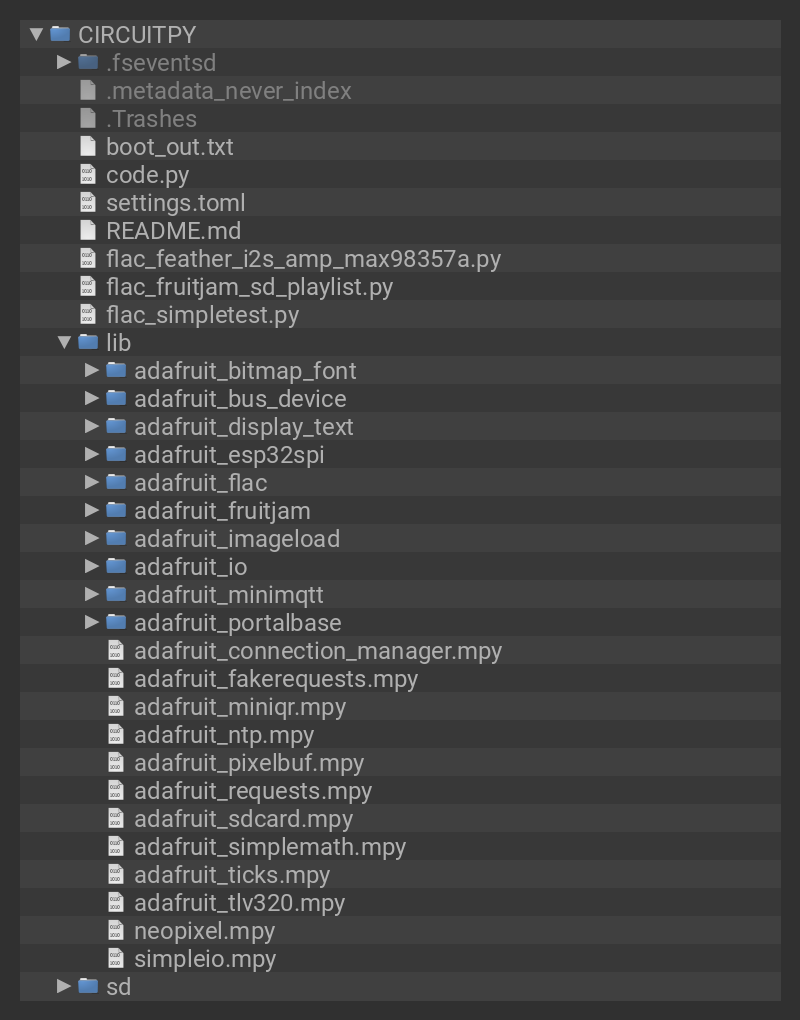
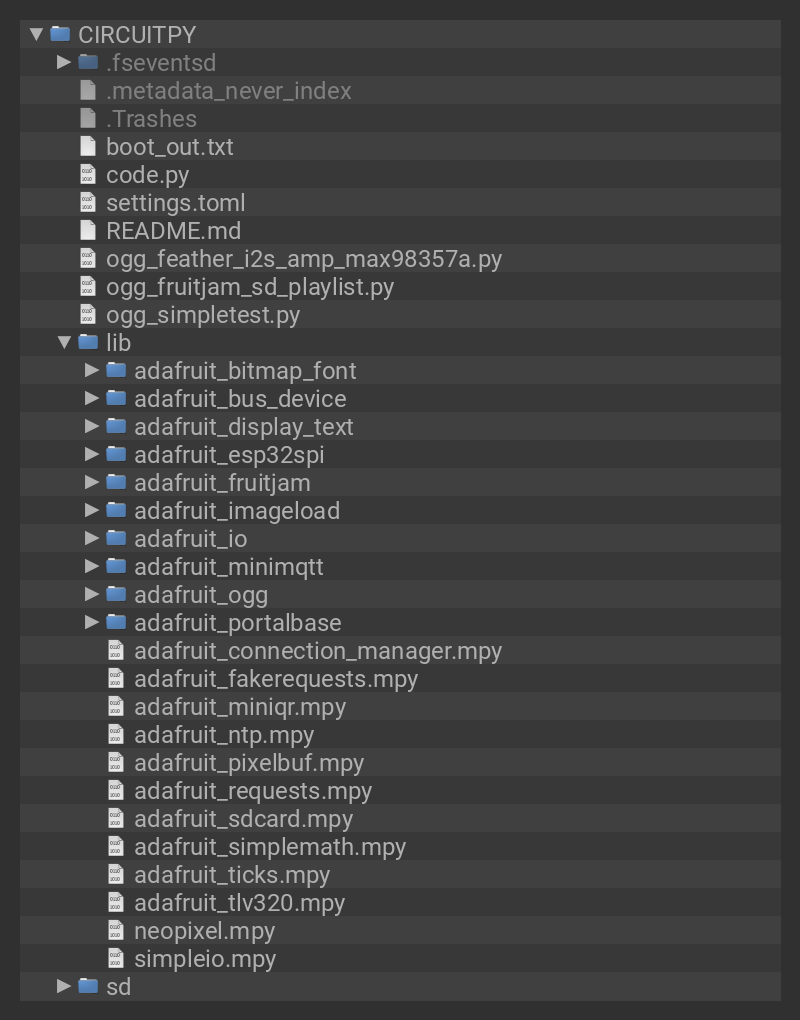
After downloading the Project Bundle, plug the Fruit Jam into your computer's USB port with a known good USB data+power cable. You should see a new flash drive appear in the computer's File Explorer or Finder (depending on your operating system) called CIRCUITPY. Open the zip file and copy the following items to the Fruit Jam CIRCUITPY drive.
- lib folder
- code.py
Your Fruit Jam CIRCUITPY drive should look like this after copying the files and folders:
Sample Files
The following files are open source CC0 clips of FLAC and Ogg audio segments you can use with the code:
- FLAC (stereo, 22050 Hz)
- FLAC (stereo, 39kHz)
- FLAC (mono)
- Ogg (stereo, 22050 Hz)
- Ogg (stereo, 39kHz)
- Ogg (mono)
FLAC Source. Ogg files are files converted from FLAC to Ogg at the website here.
Copy them to the root CIRCUITPY directory, naming them song.flac or song.ogg. You could also change the code to the filename of your choice.
And this is how it sounds:
On the Fruit Jam, I switched the audio to speaker and cranked up the volume to have audible audio on the recording. I was likely straining the tiny speaker capacity.
Here are advanced programs which reads files off an SD card and play them (FLAC version and Ogg version):
# SPDX-FileCopyrightText: Copyright (c) 2026 Mikey Sklar for Adafruit Industries
#
# SPDX-License-Identifier: MIT

"""Play every FLAC file on the Fruit Jam's microSD card, in alphabetical order.

CircuitPython mounts the card at /sd on the Fruit Jam. For files up to 48 kHz; see
flac_fruitjam_sd_hires.py for 88.2/96 kHz.
"""

import os
from adafruit_fruitjam.peripherals import Peripherals
import adafruit_flac

fruit_jam = Peripherals(audio_output="headphone")
fruit_jam.volume = 0.5

flac_files = sorted(
    "/sd/" + name
    for name in os.listdir("/sd")
    if name.lower().endswith(".flac") and not name.startswith(".")
)

# Make one decoder and reuse it for every file; this avoids running out of memory.
decoder = adafruit_flac.FLACDecoder(flac_files[0])
player = adafruit_flac.FLACPlayer(fruit_jam.audio)

while True:
    for filename in flac_files:
        decoder.open(filename)
        fruit_jam.dac.configure_clocks(sample_rate=decoder.sample_rate, bit_depth=16)
        print("Playing", filename)
        player.play(decoder)
        while player.playing:
            player.update()  # your code can run here too, between updates
# SPDX-FileCopyrightText: Copyright (c) 2026 Mikey Sklar for Adafruit Industries
#
# SPDX-License-Identifier: MIT

"""Play every Ogg Vorbis file on the Fruit Jam's microSD card, in alphabetical order.

CircuitPython mounts the card at /sd on the Fruit Jam.
"""

import os
import adafruit_ogg

ogg_files = sorted(
    "/sd/" + name
    for name in os.listdir("/sd")
    if name.lower().endswith(".ogg") and not name.startswith(".")
)

# Make the decoder before Peripherals: it decodes several times faster with its buffers in
# internal RAM, which Peripherals would otherwise fill. Reuse it for every file.
decoder = adafruit_ogg.OggDecoder(ogg_files[0])

from adafruit_fruitjam.peripherals import Peripherals  # pylint: disable=wrong-import-position

fruit_jam = Peripherals(audio_output="headphone")
fruit_jam.volume = 0.5
player = adafruit_ogg.OggPlayer(fruit_jam.audio)

while True:
    for filename in ogg_files:
        decoder.open(filename)
        fruit_jam.dac.configure_clocks(sample_rate=decoder.sample_rate, bit_depth=16)
        print("Playing", filename, decoder.comments.get("TITLE", ""))
        player.play(decoder)
        while player.playing:
            player.update()  # your code can run here too, between updates
Page last edited October 22, 2026


