
Overview
Shot timers are great tools for anyone trying to progress their shooting skills. Unfortunately, they're super expensive! That's where this project comes in.
In this project, you will create an open-source shot timer using the Adafruit Clue board. It will have a GUI with a full menu, multiple modes, and persistent settings.


Page last edited March 08, 2024
CircuitPython on CLUE
CircuitPython is a derivative of MicroPython designed to simplify experimentation and education on low-cost microcontrollers. It makes it easier than ever to get prototyping by requiring no upfront desktop software downloads. Simply copy and edit files on the CIRCUITPY flash drive to iterate.
The following instructions will show you how to install CircuitPython. If you've already installed CircuitPython but are looking to update it or reinstall it, the same steps work for that as well!
Set up CircuitPython Quick Start!
Follow this quick step-by-step for super-fast Python power :)

Click the link above to download the latest version of CircuitPython for the CLUE.
Download and save it to your desktop (or wherever is handy).

Plug your CLUE into your computer using a known-good USB cable.
A lot of people end up using charge-only USB cables and it is very frustrating! So make sure you have a USB cable you know is good for data sync.
Double-click the Reset button on the top (magenta arrow) on your board, and you will see the NeoPixel RGB LED (green arrow) turn green. If it turns red, check the USB cable, try another USB port, etc. Note: The little red LED next to the USB connector will pulse red. That's ok!
If double-clicking doesn't work the first time, try again. Sometimes it can take a few tries to get the rhythm right!


You will see a new disk drive appear called CLUEBOOT.
Drag the adafruit-circuitpython-clue-etc.uf2 file to CLUEBOOT.

The LED will flash. Then, the CLUEBOOT drive will disappear and a new disk drive called CIRCUITPY will appear.
If this is the first time you're installing CircuitPython or you're doing a completely fresh install after erasing the filesystem, you will have two files - boot_out.txt, and code.py, and one folder - lib on your CIRCUITPY drive.
If CircuitPython was already installed, the files present before reloading CircuitPython should still be present on your CIRCUITPY drive. Loading CircuitPython will not create new files if there was already a CircuitPython filesystem present.
That's it, you're done! :)
Page last edited March 08, 2024
Code the Shot Timer
To use with CircuitPython, you need to first install a few libraries, into the lib folder on your CIRCUITPY drive. Then you need to update code.py with the example script.
Thankfully, we can do this in one go. In the example below, click the Download Project Bundle button below to download the necessary libraries and the code.py file in a zip file. Extract the contents of the zip file, open the directory Clue_Shot_Timer/ and then click on the directory that matches the version of CircuitPython you're using.
Connect your MagTag board to your computer via a known good USB data+power cable. The board should show up as a thumb drive named CIRCUITPY in Explorer or Finder (depending on your operating system). Copy the contents of that directory to your CIRCUITPY drive.
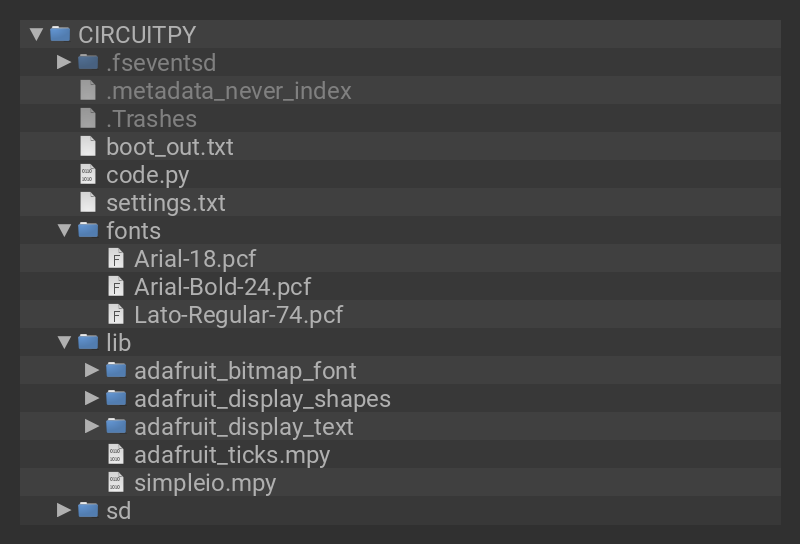
Your CIRCUITPY drive should now look similar to the following image:
# SPDX-FileCopyrightText: 2023 Eva Herrada for Adafruit Industries
#
# SPDX-License-Identifier: MIT
import array
import random
import time
import gc
import simpleio
import audiobusio
import displayio
from adafruit_display_text import label
from adafruit_bitmap_font import bitmap_font
from adafruit_display_shapes.rect import Rect
import board
import digitalio
settings = {}
with open("/settings.txt", "r") as F:
for line in F:
k, v = line.replace("\n", "").split(",")
print(k, v)
settings[k] = v
MODE = settings["mode"]
if settings["delay"] == "RNDM":
DELAY_TIME = settings["delay"]
else:
DELAY_TIME = int(settings["delay"])
PB = float(settings["pb"])
PAR = float(settings["par"])
SENSITIVITY = int(settings["sensitivity"])
gc.enable()
DEAD_TIME_DELAY = 0.11
arial18 = bitmap_font.load_font("/fonts/Arial-18.pcf")
arialb24 = bitmap_font.load_font("/fonts/Arial-Bold-24.pcf")
lato74 = bitmap_font.load_font("/fonts/Lato-Regular-74.pcf")
display = board.DISPLAY
display.auto_refresh = False
group = displayio.Group()
button_a = digitalio.DigitalInOut(board.BUTTON_A)
button_a.switch_to_input(pull=digitalio.Pull.UP)
button_b = digitalio.DigitalInOut(board.BUTTON_B)
button_b.switch_to_input(pull=digitalio.Pull.UP)
main_time = label.Label(
font=lato74,
anchored_position=(120, 40),
text="00.00",
color=0xFFFFFF,
anchor_point=(0.5, 0.5),
)
group.append(main_time)
shot_num = label.Label(
font=arialb24,
anchored_position=(120, 80),
text="#0 SPL 00.00",
anchor_point=(0.5, 0),
)
group.append(shot_num)
first = label.Label(
font=arialb24,
anchored_position=(120, 120),
text="1st: 00.00",
anchor_point=(0.5, 0),
)
group.append(first)
delay = label.Label(
font=arialb24,
anchored_position=(120, 160),
text=f"Delay: {DELAY_TIME}",
anchor_point=(0.5, 0),
)
group.append(delay)
sens = label.Label(font=arialb24, x=15, y=220, text=f"{SENSITIVITY}")
group.append(sens)
if MODE == "PB":
mode_text = f"{MODE} {PB:05.2f}"
elif MODE == "Par":
mode_text = f"{MODE} {PAR:05.2f}"
else:
mode_text = MODE
mode_label = label.Label(
font=arialb24, anchored_position=(225, 210), text=mode_text, anchor_point=(1, 0)
)
group.append(mode_label)
def normalized_rms(values):
"""Gets the normalized RMS of the mic samples"""
minbuf = int(sum(values) / len(values))
samples_sum = sum(float(sample - minbuf) * (sample - minbuf) for sample in values)
return (samples_sum / len(values)) ** 0.5
def picker(current):
"""Displays screen allowing user to set a time"""
pick[0].text, pick[1].text, pick[2].text, pick[3].text = list(
current.replace(".", "")
)
display.root_group = pick
time.sleep(0.2)
index = 0
while True:
if not button_b.value:
pick[index].background_color = None
pick[index].color = 0xFFFFFF
index += 1
if index == 4:
index = 0
pick[index].background_color = 0xFFFFFF
pick[index].color = 0x000000
started = time.monotonic()
while not button_b.value:
if time.monotonic() - started > 1:
pick[0].color = 0x000000
pick[0].background_color = 0xFFFFFF
pick[1].color = 0xFFFFFF
pick[1].background_color = None
pick[2].color = 0xFFFFFF
pick[2].background_color = None
pick[3].color = 0xFFFFFF
pick[3].background_color = None
return float(
f"{pick[0].text}{pick[1].text}.{pick[2].text}{pick[3].text}"
)
if not button_a.value:
pick[index].text = str(int(pick[index].text) + 1)[-1]
started = time.monotonic()
while not button_a.value:
if time.monotonic() - started > 1:
return current
display.refresh()
display.root_group = displayio.CIRCUITPYTHON_TERMINAL
def rect_maker(shots):
rects = displayio.Group()
for i in range(len(shots)):
if i == 10:
break
rectangle = Rect(x=0, y=24 + (i * 24), width=240, height=1, fill=0xFFFFFF)
rects.append(rectangle)
return rects
def shot_label_maker(grp):
txt = ""
for i, j in enumerate(shot_list):
if i == 0:
split = j
else:
split = j - shot_list[i - 1]
txt = txt + f"{i+1:02}\t{j:05.2f}\t{split:05.2f}\n"
grp.append(
label.Label(
font=arial18,
anchored_position=(120, 3),
text=txt[:-1],
color=0xFFFFFF,
line_spacing=0.82,
anchor_point=(0.5, 0),
)
)
gc.collect()
return grp
def show_shot_list(shots, disp):
done = False
shot_group = rect_maker(shots)
shot_group = shot_label_maker(shot_group)
disp.root_group = shot_group
tracker = 10
while True:
if not button_b.value:
started = time.monotonic()
while not button_b.value:
if time.monotonic() - started > 1:
done = True
break
if tracker < len(shots) and not done:
shot_group[10].y -= 24
tracker += 1
if not button_a.value:
started = time.monotonic()
while not button_a.value:
if time.monotonic() - started > 1:
done = True
break
if tracker > 10 and not done:
shot_group[10].y += 24
tracker -= 1
if done:
break
disp.refresh()
shot_group = None
gc.collect()
def menu_mode(
mode, delay_time, sensitivity_, pb, par, length_, submenus_
): # pylint: disable=too-many-branches,too-many-statements
selected = int(menu[0].y / 40) + 1
display.root_group = menu
display.refresh()
page_ = menu
while not button_a.value:
pass
done = False
while not done:
if not button_a.value and selected < length_:
started = time.monotonic()
while not button_a.value:
if time.monotonic() - started > 1:
if page_ == menu:
display.root_group = group
display.refresh()
done = True
else:
page_ = menu
selected = int(page_[0].y / 40) + 1
length_ = len(page_) - 1
display.root_group = page_
submenus_ = main_menu_opts
display.refresh()
break
else:
if not done:
rgb = page_[selected].color
color = (
((255 - ((rgb >> 16) & 0xFF)) << 16)
+ ((255 - ((rgb >> 8) & 0xFF)) << 8)
+ (255 - (rgb & 0xFF))
)
page_[selected].color = color
page_[0].y += 40
selected += 1
rgb = page_[selected].color
color = (
((255 - ((rgb >> 16) & 0xFF)) << 16)
+ ((255 - ((rgb >> 8) & 0xFF)) << 8)
+ (255 - (rgb & 0xFF))
)
page_[selected].color = color
while not button_a.value:
pass
if not button_a.value and selected == length_ and not done:
started = time.monotonic()
while not button_a.value:
if time.monotonic() - started > 1:
if page_ == menu:
display.root_group = group
display.refresh()
done = True
else:
page_ = menu
selected = int(page_[0].y / 40) + 1
length_ = len(page_) - 1
display.root_group = page_
submenus_ = main_menu_opts
display.refresh()
break
else:
if not done:
rgb = page_[selected].color
color = (
((255 - ((rgb >> 16) & 0xFF)) << 16)
+ ((255 - ((rgb >> 8) & 0xFF)) << 8)
+ (255 - (rgb & 0xFF))
)
page_[selected].color = color
page_[0].y = 0
selected = 1
rgb = page_[selected].color
color = (
((255 - ((rgb >> 16) & 0xFF)) << 16)
+ ((255 - ((rgb >> 8) & 0xFF)) << 8)
+ (255 - (rgb & 0xFF))
)
page_[selected].color = color
while not button_a.value:
pass
if not button_b.value:
if isinstance(submenus_[1], list):
if submenus_[0] == mode:
mode = submenus_[1][selected - 1]
submenus_[0] = mode
if mode == "PB":
pb = picker(f"{PB:05.2f}")
mode_label.text = f"{mode} {pb}"
page_[selected].text = mode_label.text
display.root_group = page_
display.refresh()
elif mode == "Par":
par = picker(f"{par:05.2f}")
mode_label.text = f"{mode} {par}"
page_[selected].text = mode_label.text
display.root_group = page_
display.refresh()
else:
mode_label.text = mode
if submenus_[0] == delay_time and len(submenus_[1]) == 5:
delay_time = submenus_[1][selected - 1]
submenus_[0] = delay_time
delay.text = f"Delay: {delay_time}"
if submenus_[0] == sensitivity_ and len(submenus_[1]) == 6:
sensitivity_ = submenus_[1][selected - 1]
submenus_[0] = sensitivity_
sens.text = f"{sensitivity_}"
for i in page_:
i.color = 0xFFFFFF
page_[selected].color = 0x00FF00
else:
page_ = submenus_[selected - 1]
submenus_ = page_opts[selected - 1]
selected = int(page_[0].y / 40) + 1
length_ = len(page_) - 1
display.root_group = page_
while not button_b.value:
pass
display.refresh()
return mode, delay_time, sensitivity_, pb, par
def label_maker(txt, grp, font, x, y, x_step=0, y_step=0, anchor=None, padding=0):
for count, t in enumerate(txt):
x_pos = x + (count * x_step)
y_pos = y + (count * y_step)
if anchor:
grp.append(
label.Label(
font,
text=t,
anchored_position=(x_pos, y_pos),
color=0xFFFFFF,
padding_top=padding,
anchor_point=anchor,
)
)
else:
grp.append(
label.Label(
font, text=t, x=x_pos, y=y_pos, color=0xFFFFFF, padding_top=padding
)
)
return grp
mode_opts = [MODE, ["Default", "PB", "Par"]]
delay_opts = [DELAY_TIME, [0, 1, 3, 5, "RNDM"]]
sensitivity_opts = [SENSITIVITY, [1, 2, 3, 4, 5, 6]]
# Number picker page
pick = displayio.Group()
pick = label_maker(
["0", "0"], pick, lato74, 40, 120, x_step=50, anchor=(0.5, 0.5), padding=8
)
pick = label_maker(
["0", "0"], pick, lato74, 150, 120, x_step=50, anchor=(0.5, 0.5), padding=8
)
pick[0].color = 0x000000
pick[0].background_color = 0xFFFFFF
dot = label.Label(
lato74,
text=".",
color=0xFFFFFF,
anchor_point=(0.5, 0.5),
anchored_position=(120, 132),
)
pick.append(dot)
# Main menu page
menu = displayio.Group()
rect = Rect(0, 0, 240, 40, fill=0xFFFFFF)
menu.append(rect)
menu = label_maker(["Mode", "Delay", "Sensitivity"], menu, arialb24, 10, 20, y_step=40)
menu[1].color = 0x000000
# Mode menu page
mode_page = displayio.Group()
select = mode_opts[1].index(MODE)
rect = Rect(0, select * 40, 240, 40, fill=0xFFFFFF)
mode_page.append(rect)
mode_page = label_maker(
["Default", f"PB {PB}", f"Par {PAR}"], mode_page, arialb24, 10, 20, y_step=40
)
mode_page[select + 1].color = 0x00FF00
# Delay menu page
delay_page = displayio.Group()
select = delay_opts[1].index(DELAY_TIME)
rect = Rect(0, select * 40, 240, 40, fill=0xFFFFFF)
delay_page.append(rect)
delay_page = label_maker(
["0s", "1s", "3s", "5s", "Random"], delay_page, arialb24, 10, 20, y_step=40
)
delay_page[select + 1].color = 0x00FF00
# Sensitivity menu page
sensitivity_page = displayio.Group()
select = sensitivity_opts[1].index(SENSITIVITY)
rect = Rect(0, select * 40, 240, 40, fill=0xFFFFFF)
sensitivity_page.append(rect)
sensitivity_page = label_maker(
["1", "2", "3", "4", "5", "6"], sensitivity_page, arialb24, 10, 20, y_step=40
)
sensitivity_page[select + 1].color = 0x00FF00
main_menu_opts = [mode_page, delay_page, sensitivity_page]
page_opts = [mode_opts, delay_opts, sensitivity_opts]
submenus = main_menu_opts
page = menu
length = len(page) - 1
mic = audiobusio.PDMIn(
board.MICROPHONE_CLOCK,
board.MICROPHONE_DATA,
sample_rate=16000,
bit_depth=16,
)
sensitivity_settings = [8000, 10000, 15000, 20000, 25000, 30000]
display.root_group = group
display.refresh()
sensitivity = sensitivity_settings[SENSITIVITY - 1]
while True:
if not button_b.value:
SHOTS = 0
samples = array.array("H", [0] * 5)
if DELAY_TIME == "RNDM":
dly = round(random.uniform(1, 10), 2)
time.sleep(dly)
else:
time.sleep(DELAY_TIME)
start = time.monotonic()
while not button_b.value:
pass
shot_list = []
simpleio.tone(board.SPEAKER, 3500, duration=0.2)
time.sleep(0.05)
if MODE == "Par":
shot_time = round(time.monotonic() - start, 2)
while shot_time < PAR:
shot_time = min(round(time.monotonic() - start, 2), PAR)
main_time.text = f"{shot_time:05.2f}"
display.refresh()
simpleio.tone(board.SPEAKER, 3500, duration=0.2)
else:
if MODE == "PB":
main_time.color = 0x00FF00
display.refresh()
while button_a.value and button_b.value:
mic.record(samples, len(samples))
magnitude = normalized_rms(samples)
if magnitude > sensitivity:
SHOTS += 1
print("SHOT")
shot_time = round(time.monotonic() - start, 2)
if len(shot_list) != 0:
shot_num.text = (
f"#{SHOTS} SPL {shot_time - shot_list[-1]:05.2f}"
)
else:
shot_num.text = f"#{SHOTS} SPL {shot_time:05.2f}"
main_time.text = f"{shot_time:05.2f}"
if MODE == "PB" and shot_time > PB:
main_time.color = 0xFF0000
shot_list.append(shot_time)
first.text = f"1st: {shot_list[0]:05.2f}"
time.sleep(DEAD_TIME_DELAY)
display.refresh()
print(
(
magnitude,
SHOTS,
)
)
gc.collect()
if not button_b.value:
show_shot_list(shot_list, display)
display.root_group = group
display.refresh()
while not button_b.value or not button_a.value:
pass
if not button_a.value:
start = time.monotonic()
while not button_a.value:
if time.monotonic() - start > 1:
MODE, DELAY_TIME, SENSITIVITY, PB, PAR = menu_mode(
MODE, DELAY_TIME, SENSITIVITY, PB, PAR, length, submenus
)
sensitivity = sensitivity_settings[SENSITIVITY - 1]
try:
with open("/settings.txt", "w") as F:
F.write(f"mode,{MODE}\n")
F.write(f"delay,{DELAY_TIME}\n")
F.write(f"par,{PAR}\n")
F.write(f"pb,{PB}\n")
F.write(f"sensitivity,{SENSITIVITY}")
except OSError as e: # Typically when the filesystem isn't writeable...
print("Filesystem is not writeable")
break
else:
main_time.color = 0xFFFFFF
main_time.text = "00.00"
shot_num.text = "#0 SPL 00.00"
first.text = "1st: 00.00"
display.refresh()
gc.collect()
The code starts by importing the required libraries.
import array
import random
import time
import gc
import simpleio
import audiobusio

import displayio
from adafruit_display_text import label
from adafruit_bitmap_font import bitmap_font
from adafruit_display_shapes.rect import Rect

import board
import digitalio
Next, the persistent settings file is opened and read and the corresponding variables are set.
settings = {}

with open("/settings.txt", "r") as F:
    for line in F:
        k, v = line.replace("\n", "").split(",")
        print(k, v)
        settings[k] = v

MODE = settings["mode"]
if settings["delay"] == "RNDM":
    DELAY_TIME = settings["delay"]
else:
    DELAY_TIME = int(settings["delay"])
PB = float(settings["pb"])
PAR = float(settings["par"])
SENSITIVITY = int(settings["sensitivity"])
After that, the time to wait after a shot before looking for another one, DEAD_TIME_DELAY, is set, the fonts are imported, and the display and buttons are set up.
gc.enable()
DEAD_TIME_DELAY = 0.11

arial18 = bitmap_font.load_font("/fonts/Arial-18.pcf")
arialb24 = bitmap_font.load_font("/fonts/Arial-Bold-24.pcf")
lato74 = bitmap_font.load_font("/fonts/Lato-Regular-74.pcf")

display = board.DISPLAY

display.auto_refresh = False

group = displayio.Group()

button_a = digitalio.DigitalInOut(board.BUTTON_A)
button_a.switch_to_input(pull=digitalio.Pull.UP)
button_b = digitalio.DigitalInOut(board.BUTTON_B)
button_b.switch_to_input(pull=digitalio.Pull.UP)
Then, the labels for the timer screen are created.
main_time = label.Label(
    font=lato74,
    anchored_position=(120, 40),
    text="00.00",
    color=0xFFFFFF,
    anchor_point=(0.5, 0.5),
)
group.append(main_time)

shot_num = label.Label(
    font=arialb24,
    anchored_position=(120, 80),
    text="#0   SPL 00.00",
    anchor_point=(0.5, 0),
)
group.append(shot_num)

first = label.Label(
    font=arialb24,
    anchored_position=(120, 120),
    text="1st: 00.00",
    anchor_point=(0.5, 0),
)
group.append(first)

delay = label.Label(
    font=arialb24,
    anchored_position=(120, 160),
    text=f"Delay: {DELAY_TIME}",
    anchor_point=(0.5, 0),
)
group.append(delay)

sens = label.Label(font=arialb24, x=15, y=220, text=f"{SENSITIVITY}")
group.append(sens)

if MODE == "PB":
    mode_text = f"{MODE} {PB:05.2f}"
elif MODE == "Par":
    mode_text = f"{MODE} {PAR:05.2f}"
else:
    mode_text = MODE
mode_label = label.Label(
    font=arialb24, anchored_position=(225, 210), text=mode_text, anchor_point=(1, 0)
)
group.append(mode_label)
The first function the code will need is now declared. It is used to help out with getting the volume from the microphone.
def normalized_rms(values):
    """Gets the normalized RMS of the mic samples"""
    minbuf = int(sum(values) / len(values))
    samples_sum = sum(float(sample - minbuf) * (sample - minbuf) for sample in values)

    return (samples_sum / len(values)) ** 0.5
The next function is used to pick the time for the PB and Par modes. It works by setting up a number of different labels and then allowing the user to change the number displayed on those labels. The colors on the labels are changed to indicate the currently selected number.
def picker(current):
    """Displays screen allowing user to set a time"""
    pick[0].text, pick[1].text, pick[2].text, pick[3].text = list(
        current.replace(".", "")
    )
    display.root_group = pick
    time.sleep(0.2)
    index = 0

    while True:
        if not button_b.value:
            pick[index].background_color = None
            pick[index].color = 0xFFFFFF
            index += 1
            if index == 4:
                index = 0
            pick[index].background_color = 0xFFFFFF
            pick[index].color = 0x000000
            started = time.monotonic()
            while not button_b.value:
                if time.monotonic() - started > 1:
                    pick[0].color = 0x000000
                    pick[0].background_color = 0xFFFFFF
                    pick[1].color = 0xFFFFFF
                    pick[1].background_color = None
                    pick[2].color = 0xFFFFFF
                    pick[2].background_color = None
                    pick[3].color = 0xFFFFFF
                    pick[3].background_color = None
                    return float(
                        f"{pick[0].text}{pick[1].text}.{pick[2].text}{pick[3].text}"
                    )

        if not button_a.value:
            pick[index].text = str(int(pick[index].text) + 1)[-1]
            started = time.monotonic()
            while not button_a.value:
                if time.monotonic() - started > 1:
                    return current
        display.refresh()

    display.root_group = displayio.CIRCUITPYTHON_TERMINAL
This function is used to create the lines (they're actually rectangles with transparent fill) for the shot list.
def rect_maker(shots):
    rects = displayio.Group()
    for i in range(len(shots)):
        if i == 10:
            break
        rectangle = Rect(x=0, y=24 + (i * 24), width=240, height=1, fill=0xFFFFFF)
        rects.append(rectangle)
    return rects
This function is also a helper for the shot list page. It creates and formats the label for the shot list text and adds it to the group.
def shot_label_maker(grp):
    txt = ""

    for i, j in enumerate(shot_list):
        if i == 0:
            split = j
        else:
            split = j - shot_list[i - 1]
        txt = txt + f"{i+1:02}\t{j:05.2f}\t{split:05.2f}\n"
    grp.append(
        label.Label(
            font=arial18,
            anchored_position=(120, 3),
            text=txt[:-1],
            color=0xFFFFFF,
            line_spacing=0.82,
            anchor_point=(0.5, 0),
        )
    )
    gc.collect()
    return grp
This function is used to show the shot list. It uses the two previous functions to add the required items to the screen and then displays it. This page can be navigated by pressing the buttons on the front of the screen.
def show_shot_list(shots, disp):
    done = False

    shot_group = rect_maker(shots)
    shot_group = shot_label_maker(shot_group)
    disp.root_group = shot_group

    tracker = 10
    while True:
        if not button_b.value:
            started = time.monotonic()
            while not button_b.value:
                if time.monotonic() - started > 1:
                    done = True
                    break
            if tracker < len(shots) and not done:
                shot_group[10].y -= 24
                tracker += 1

        if not button_a.value:
            started = time.monotonic()
            while not button_a.value:
                if time.monotonic() - started > 1:
                    done = True
                    break
            if tracker > 10 and not done:
                shot_group[10].y += 24
                tracker -= 1

        if done:
            break
        disp.refresh()
    shot_group = None
    gc.collect()
menu_mode function
next is the function that handles the menu mode. It's pretty long, so it'll be split up into small chunks below.
def menu_mode(
    mode, delay_time, sensitivity_, pb, par, length_, submenus_
):  # pylint: disable=too-many-branches,too-many-statements
    selected = int(menu[0].y / 40) + 1
    display.root_group = menu
    display.refresh()
    page_ = menu
    while not button_a.value:
        pass
    done = False
    while not done:
        if not button_a.value and selected < length_:
            started = time.monotonic()
            while not button_a.value:
                if time.monotonic() - started > 1:
                    if page_ == menu:
                        display.root_group = group
                        display.refresh()
                        done = True
                    else:
                        page_ = menu
                        selected = int(page_[0].y / 40) + 1
                        length_ = len(page_) - 1
                        display.root_group = page_
                        submenus_ = main_menu_opts
                        display.refresh()
                        break
            else:
                if not done:
                    rgb = page_[selected].color
                    color = (
                        ((255 - ((rgb >> 16) & 0xFF)) << 16)
                        + ((255 - ((rgb >> 8) & 0xFF)) << 8)
                        + (255 - (rgb & 0xFF))
                    )
                    page_[selected].color = color

                    page_[0].y += 40
                    selected += 1

                    rgb = page_[selected].color
                    color = (
                        ((255 - ((rgb >> 16) & 0xFF)) << 16)
                        + ((255 - ((rgb >> 8) & 0xFF)) << 8)
                        + (255 - (rgb & 0xFF))
                    )
                    page_[selected].color = color
            while not button_a.value:
                pass

        if not button_a.value and selected == length_ and not done:
            started = time.monotonic()
            while not button_a.value:
                if time.monotonic() - started > 1:
                    if page_ == menu:
                        display.root_group = group
                        display.refresh()
                        done = True
                    else:
                        page_ = menu
                        selected = int(page_[0].y / 40) + 1
                        length_ = len(page_) - 1
                        display.root_group = page_
                        submenus_ = main_menu_opts
                        display.refresh()
                        break
            else:
                if not done:
                    rgb = page_[selected].color
                    color = (
                        ((255 - ((rgb >> 16) & 0xFF)) << 16)
                        + ((255 - ((rgb >> 8) & 0xFF)) << 8)
                        + (255 - (rgb & 0xFF))
                    )
                    page_[selected].color = color

                    page_[0].y = 0
                    selected = 1

                    rgb = page_[selected].color
                    color = (
                        ((255 - ((rgb >> 16) & 0xFF)) << 16)
                        + ((255 - ((rgb >> 8) & 0xFF)) << 8)
                        + (255 - (rgb & 0xFF))
                    )
                    page_[selected].color = color
            while not button_a.value:
                pass

        if not button_b.value:
            if isinstance(submenus_[1], list):
                if submenus_[0] == mode:
                    mode = submenus_[1][selected - 1]
                    submenus_[0] = mode
                    if mode == "PB":
                        pb = picker(f"{PB:05.2f}")
                        mode_label.text = f"{mode} {pb}"
                        page_[selected].text = mode_label.text
                        display.root_group = page_
                        display.refresh()
                    elif mode == "Par":
                        par = picker(f"{par:05.2f}")
                        mode_label.text = f"{mode} {par}"
                        page_[selected].text = mode_label.text
                        display.root_group = page_
                        display.refresh()
                    else:
                        mode_label.text = mode
                if submenus_[0] == delay_time and len(submenus_[1]) == 5:
                    delay_time = submenus_[1][selected - 1]
                    submenus_[0] = delay_time
                    delay.text = f"Delay: {delay_time}"
                if submenus_[0] == sensitivity_ and len(submenus_[1]) == 6:
                    sensitivity_ = submenus_[1][selected - 1]
                    submenus_[0] = sensitivity_
                    sens.text = f"{sensitivity_}"
                for i in page_:
                    i.color = 0xFFFFFF
                page_[selected].color = 0x00FF00
            else:
                page_ = submenus_[selected - 1]
                submenus_ = page_opts[selected - 1]
                selected = int(page_[0].y / 40) + 1
                length_ = len(page_) - 1
                display.root_group = page_
            while not button_b.value:
                pass

        display.refresh()
    return mode, delay_time, sensitivity_, pb, par
The first bit of this function starts off by defining a few variables. Then it goes into the main loop of the menu mode. This part handles moving the cursor between different options. The visual cursor is a white box that moves when the A button is pressed. If the A button is held for one second, it moves the menu up one level or exits the menu mode if it is already on the top level.
⠀⠀⠀selected = int(menu[0].y / 40) + 1
    display.root_group = menu
    display.refresh()
    page_ = menu
    while not button_a.value:
        pass
    done = False
    while not done:
        if not button_a.value and selected < length_:
            started = time.monotonic()
            while not button_a.value:
                if time.monotonic() - started > 1:
                    if page_ == menu:
                        display.root_group = group
                        display.refresh()
                        done = True
                    else:
                        page_ = menu
                        selected = int(page_[0].y / 40) + 1
                        length_ = len(page_) - 1
                        display.root_group = page_
                        submenus_ = main_menu_opts
                        display.refresh()
                        break
            else:
                if not done:
                    rgb = page_[selected].color
                    color = (
                        ((255 - ((rgb >> 16) & 0xFF)) << 16)
                        + ((255 - ((rgb >> 8) & 0xFF)) << 8)
                        + (255 - (rgb & 0xFF))
                    )
                    page_[selected].color = color

                    page_[0].y += 40
                    selected += 1

                    rgb = page_[selected].color
                    color = (
                        ((255 - ((rgb >> 16) & 0xFF)) << 16)
                        + ((255 - ((rgb >> 8) & 0xFF)) << 8)
                        + (255 - (rgb & 0xFF))
                    )
                    page_[selected].color = color
            while not button_a.value:
                pass
Next the code runs through what to do if the B button is pressed, which either goes to the submenu of the current menu, activates a number picker, or selects the currently highlighted option.
At the end of the function, after it has been exited as described above, it passes the updated settings back to the main code loop so they can be applied.
⠀⠀⠀⠀⠀⠀⠀if not button_b.value:
            if isinstance(submenus_[1], list):
                if submenus_[0] == mode:
                    mode = submenus_[1][selected - 1]
                    submenus_[0] = mode
                    if mode == "PB":
                        pb = picker(f"{PB:05.2f}")
                        mode_label.text = f"{mode} {pb}"
                        page_[selected].text = mode_label.text
                        display.root_group = page_
                        display.refresh()
                    elif mode == "Par":
                        par = picker(f"{par:05.2f}")
                        mode_label.text = f"{mode} {par}"
                        page_[selected].text = mode_label.text
                        display.root_group = page_
                        display.refresh()
                    else:
                        mode_label.text = mode
                if submenus_[0] == delay_time and len(submenus_[1]) == 5:
                    delay_time = submenus_[1][selected - 1]
                    submenus_[0] = delay_time
                    delay.text = f"Delay: {delay_time}"
                if submenus_[0] == sensitivity_ and len(submenus_[1]) == 6:
                    sensitivity_ = submenus_[1][selected - 1]
                    submenus_[0] = sensitivity_
                    sens.text = f"{sensitivity_}"
                for i in page_:
                    i.color = 0xFFFFFF
                page_[selected].color = 0x00FF00
            else:
                page_ = submenus_[selected - 1]
                submenus_ = page_opts[selected - 1]
                selected = int(page_[0].y / 40) + 1
                length_ = len(page_) - 1
                display.root_group = page_
            while not button_b.value:
                pass

        display.refresh()
    return mode, delay_time, sensitivity_, pb, par
Moving on to the next function, this one makes all the labels for the menu.
def label_maker(txt, grp, font, x, y, x_step=0, y_step=0, anchor=None, padding=0):
    for count, t in enumerate(txt):
        x_pos = x + (count * x_step)
        y_pos = y + (count * y_step)
        if anchor:
            grp.append(
                label.Label(
                    font,
                    text=t,
                    anchored_position=(x_pos, y_pos),
                    color=0xFFFFFF,
                    padding_top=padding,
                    anchor_point=anchor,
                )
            )
        else:
            grp.append(
                label.Label(
                    font, text=t, x=x_pos, y=y_pos, color=0xFFFFFF, padding_top=padding
                )
            )
    return grp
A few lists are then made to be used in the menu as the submenu options.
mode_opts = [MODE, ["Default", "PB", "Par"]]

delay_opts = [DELAY_TIME, [0, 1, 3, 5, "RNDM"]]

sensitivity_opts = [SENSITIVITY, [1, 2, 3, 4, 5, 6]]
Now, all the various labels for the menu mode are created.
# Number picker page
pick = displayio.Group()
pick = label_maker(
    ["0", "0"], pick, lato74, 40, 120, x_step=50, anchor=(0.5, 0.5), padding=8
)
pick = label_maker(
    ["0", "0"], pick, lato74, 150, 120, x_step=50, anchor=(0.5, 0.5), padding=8
)

pick[0].color = 0x000000
pick[0].background_color = 0xFFFFFF

dot = label.Label(
    lato74,
    text=".",
    color=0xFFFFFF,
    anchor_point=(0.5, 0.5),
    anchored_position=(120, 132),
)
pick.append(dot)

# Main menu page
menu = displayio.Group()
rect = Rect(0, 0, 240, 40, fill=0xFFFFFF)
menu.append(rect)

menu = label_maker(["Mode", "Delay", "Sensitivity"], menu, arialb24, 10, 20, y_step=40)
menu[1].color = 0x000000

# Mode menu page
mode_page = displayio.Group()

select = mode_opts[1].index(MODE)
rect = Rect(0, select * 40, 240, 40, fill=0xFFFFFF)
mode_page.append(rect)

mode_page = label_maker(
    ["Default", f"PB {PB}", f"Par {PAR}"], mode_page, arialb24, 10, 20, y_step=40
)
mode_page[select + 1].color = 0x00FF00

# Delay menu page
delay_page = displayio.Group()

select = delay_opts[1].index(DELAY_TIME)
rect = Rect(0, select * 40, 240, 40, fill=0xFFFFFF)
delay_page.append(rect)

delay_page = label_maker(
    ["0s", "1s", "3s", "5s", "Random"], delay_page, arialb24, 10, 20, y_step=40
)
delay_page[select + 1].color = 0x00FF00

# Sensitivity menu page
sensitivity_page = displayio.Group()

select = sensitivity_opts[1].index(SENSITIVITY)
rect = Rect(0, select * 40, 240, 40, fill=0xFFFFFF)
sensitivity_page.append(rect)

sensitivity_page = label_maker(
    ["1", "2", "3", "4", "5", "6"], sensitivity_page, arialb24, 10, 20, y_step=40
)
sensitivity_page[select + 1].color = 0x00FF00
Before the main loop starts, a few variables need to be declared. First is an organization of the displayio groups and menu options for those groups in their corresponding menu pages. The mic and sensitivity options are then set up and the display is shown.
main_menu_opts = [mode_page, delay_page, sensitivity_page]
page_opts = [mode_opts, delay_opts, sensitivity_opts]

submenus = main_menu_opts
page = menu
length = len(page) - 1

mic = audiobusio.PDMIn(
    board.MICROPHONE_CLOCK,
    board.MICROPHONE_DATA,
    sample_rate=16000,
    bit_depth=16,
)

sensitivity_settings = [8000, 10000, 15000, 20000, 25000, 30000]

display.root_group = group
display.refresh()

sensitivity = sensitivity_settings[SENSITIVITY - 1]
Main loop
The main loop starts off by checking if Button B has been pressed. If it has, it sets some variables for recording sound and for the random delay time. Then it startss the shot timer. If it is in par mode it runs until the timer is up. If it is in personal best mode it changes the color of the main timer text depending on whether or not the set time has been surpassed. After every shot it updates the text accordingly.
It then checks if Button A has been pressed. If it has been pressed and released it resets the timer. If it is held for 1 second it enters the menu mode. When the menu mode is exited all the updated settings are written to the settings file.
while True:
    if not button_b.value:
        SHOTS = 0
        samples = array.array("H", [0] * 5)
        if DELAY_TIME == "RNDM":
            dly = round(random.uniform(1, 10), 2)
            time.sleep(dly)
        else:
            time.sleep(DELAY_TIME)
        start = time.monotonic()
        while not button_b.value:
            pass
        shot_list = []
        simpleio.tone(board.SPEAKER, 3500, duration=0.2)
        time.sleep(0.05)
        if MODE == "Par":
            shot_time = round(time.monotonic() - start, 2)
            while shot_time < PAR:
                shot_time = min(round(time.monotonic() - start, 2), PAR)
                main_time.text = f"{shot_time:05.2f}"
                display.refresh()
            simpleio.tone(board.SPEAKER, 3500, duration=0.2)
        else:
            if MODE == "PB":
                main_time.color = 0x00FF00
                display.refresh()
            while button_a.value and button_b.value:
                mic.record(samples, len(samples))
                magnitude = normalized_rms(samples)
                if magnitude > sensitivity:
                    SHOTS += 1
                    print("SHOT")
                    shot_time = round(time.monotonic() - start, 2)
                    if len(shot_list) != 0:
                        shot_num.text = (
                            f"#{SHOTS}   SPL {shot_time - shot_list[-1]:05.2f}"
                        )
                    else:
                        shot_num.text = f"#{SHOTS}   SPL {shot_time:05.2f}"
                    main_time.text = f"{shot_time:05.2f}"
                    if MODE == "PB" and shot_time > PB:
                        main_time.color = 0xFF0000
                    shot_list.append(shot_time)
                    first.text = f"1st: {shot_list[0]:05.2f}"
                    time.sleep(DEAD_TIME_DELAY)
                    display.refresh()
                    print(
                        (
                            magnitude,
                            SHOTS,
                        )
                    )
            gc.collect()
            if not button_b.value:
                show_shot_list(shot_list, display)
                display.root_group = group
                display.refresh()
                while not button_b.value or not button_a.value:
                    pass

    if not button_a.value:
        start = time.monotonic()
        while not button_a.value:
            if time.monotonic() - start > 1:
                MODE, DELAY_TIME, SENSITIVITY, PB, PAR = menu_mode(
                    MODE, DELAY_TIME, SENSITIVITY, PB, PAR, length, submenus
                )
                sensitivity = sensitivity_settings[SENSITIVITY - 1]
                try:
                    with open("/settings.txt", "w") as F:
                        F.write(f"mode,{MODE}\n")
                        F.write(f"delay,{DELAY_TIME}\n")
                        F.write(f"par,{PAR}\n")
                        F.write(f"pb,{PB}\n")
                        F.write(f"sensitivity,{SENSITIVITY}")
                except OSError as e:  # Typically when the filesystem isn't writeable...
                    print("Filesystem is not writeable")
                break
        else:
            main_time.color = 0xFFFFFF
            main_time.text = "00.00"
            shot_num.text = "#0   SPL 00.00"
            first.text = "1st: 00.00"
            display.refresh()
            gc.collect()
Page last edited March 08, 2024
Using the Shot Timer

Timer operation in default mode
Here's how you use the shot timer in default mode. To start the timer, press the button on the right side of the screen. After the delay time has been reached, the timer beeps, signaling that the timer has been started.
To review the shot times, press the B button. The screen will show the shots in a list. The first entry on each line is the shot number, the second is the shot time, and the third is the difference between that shot and the previous one. To scroll through this page press the A or B button. To return to the timer screen hold either the A or B button for 1 second.


Timer operation in personal best mode
Personal best mode works exactly the same as default mode except that when the timer starts, the main timer text turns green. It stays green and updates after every shot until the latest shot detected is above the set time, at which point it turns red.
Timer operation in par mode
Par mode works by starting the timer at the first beep and then beeping again once the set time has been reached.
Menu mode
To enter menu mode, hold down Button A for 1 second. To scroll through the options, tap Button A. To select an option, tap Button B. To go to the previous menu layer, hold Button A for 1 second. To exit the menu, hold Button A for 1 second on the upper menu layer.
Page last edited March 08, 2024


